
The short version
Claude is an AI assistant from Anthropic. Most people meet it as a chat box, ask it to write an email, and never find out it can do about ten other things that are worth far more than that.
Chat is where you talk to it. Projects give it a memory for one job. Artifacts and Design are the things it builds that you can see and keep. Skills teach it your way of working. Connectors and MCP plug it into the tools you already run. And Cowork is where it stops answering questions and starts doing the work, across your real files, on a schedule if you like.
If you only take one thing away: stop using it as a search engine and start giving it actual jobs.
I have spent an embarrassing amount of my working life explaining Claude to people who were convinced, about ten minutes earlier, that AI was coming for their job, their house and possibly their dog. It rarely takes any of the three. What it does do, if you point the right part of it at the right problem, is quietly hand you back the better part of a day a week.
The trouble is that Claude has grown a lot of features, and most people meet two or three of them and assume that is the whole show. They open the chat box, ask it to write an email, nod politely, and close the tab. That is the equivalent of buying a house and living in the hallway.
So this is the tour. No jargon for the sake of sounding clever, no breathless talk about revolutions. Just what each part does, when you would genuinely reach for it, and the one mistake that stops most people getting value out of it. I have written it for the business owner reading this at 7am with a coffee, wondering if this is going to be another thing they pay for and never use. It does not have to be.
What is Claude, in one sentence?
Claude is an AI assistant built by Anthropic. You talk to it in normal English and it helps you think, write, analyse and, more and more, get real work done across your files and tools. It sits in the same category as ChatGPT and Google Gemini. The difference that matters for you is not which model is a fraction cleverer this month. It is how much of your actual work each one can reach and finish.
The quick map: which bit does what
If you read nothing else, read this table. Everything after it is detail.
| The part | What it is | Reach for it when |
|---|---|---|
| Chat | The conversation box. Ask, get an answer. | You need to think, write or understand something quickly. |
| Projects | A workspace that remembers one job's context. | You keep re-explaining the same background every time. |
| Artifacts & Design | Documents, decks, sheets and pages Claude builds beside the chat. | The output is a thing to keep, not just an answer to read. |
| Skills | Reusable instruction packs that teach one job your way. | You do the same shaped task, to the same rules, again and again. |
| Connectors | Live links to Gmail, Drive, Slack, your CRM and more. | The work lives in tools you already use. |
| MCP | The open standard those connectors are built on. | Almost never directly. Worth knowing the name. |
| Cowork | Claude planning and doing multi-step work across your files. | You want the job finished, not instructions on how to do it. |
| Claude Code | The version that lives in a developer's terminal. | You write software. If you do not, ignore it. |
Chat: the front door
Chat is the blank box you type into, and for most people it is the whole of their relationship with Claude. It is genuinely useful on its own: drafting, summarising, explaining a contract clause in words a human can understand, turning your half-formed rant into a clear email.
The mistake nearly everyone makes is treating it like Google. You type three words, get a decent-but-generic answer, and conclude the thing is overrated. Claude is not a search engine. It is closer to a very fast, slightly over-eager graduate who has read almost everything and just needs telling, clearly, what you actually want.
How to get the best from it
Give it the context you are carrying around in your head. Who is this for, what tone, how long, what does good look like. Paste in the real example. Ask it to have a go, then tell it what is wrong. The people who get gold out of Chat are not writing clever prompts. They are just being specific, and being willing to say "no, shorter, and lose the enthusiasm".
Projects: a workspace that remembers
A Project is a room you set aside for one job, one client or one recurring piece of work. It holds its own files, its own standing instructions and its own history, so every time you come back Claude already knows the context. You are not starting from a cold, blank page each Monday.
This is the fix for the single most annoying thing about AI, which is having to re-explain your world every single time. Put your brand guidelines, your last three reports and a note on how you like things done into a Project once, and every conversation inside it inherits all of that.
How to get the best from it
If you catch yourself pasting the same background into the chat more than twice, that is your signal. Make a Project. Drop the reference material in, write two or three lines of instructions about tone and format, and let it carry the context so you do not have to.
Artifacts and Design: things you can see and keep
When Claude builds something more substantial than a paragraph, it does not bury it in the chat. It opens it beside the conversation as an Artifact: a document, a spreadsheet, a slide deck, a dashboard, a working web page. You can see it, edit it, download it and share it, and you can ask for changes in plain English rather than fiddling with the file yourself.
Design is the visual cousin of the same idea. It is a proper canvas for the things you judge with your eyes: a mockup, a poster, a landing page, a one-pager, a social graphic. You describe what you want, it lays it out, and you nudge it around until it looks right.
How to get the best from it
Reach for an Artifact whenever the output is a thing rather than an answer. And do not accept the first version out of politeness. It is a draft on a canvas, not a stone tablet. "Make the header smaller, move the chart up, and use our navy" is a perfectly good instruction.
Skills: teach it your way, once
A Skill is a reusable instruction pack that teaches Claude to do one specific job the way you do it. Your report structure. Your compliance checklist. Your tone of voice. You write the rules down once, save them, and from then on every relevant piece of work follows them without you having to nag.
To prove the point: this article was written through a Skill that holds my tone of voice, which is why it sounds like me having a coffee and not like a pamphlet from a mid-tier consultancy. Once that Skill exists, I never have to explain "no em dashes, British spelling, sound like a human" again. Claude just does it.
How to get the best from it
Look for the task you do most often to a fixed set of rules. That is your first Skill. The dull, repeatable, "everyone here knows how we do these" job is exactly the one worth teaching it, because it is the one you never want to think about again.
Connectors: plug it into your actual tools
Connectors give Claude a live link to the software you already run: Gmail, Google Drive, Slack, your calendar, your CRM, and a growing list of others. Instead of copying and pasting your world into a chat window, Claude can read and act on the real thing where it lives.
This is the step where Claude stops being a clever writing partner and starts being genuinely useful inside your business. "Find the last three emails from this supplier and summarise where we landed" only works if it can reach your inbox. Connectors are how.
How to get the best from it
You grant each connection deliberately, and you can switch it off whenever you like. So connect one tool you use daily, give it a small real task, and see how it feels before you wire up the rest. You stay in control the entire time. Nothing is touched until you say so.
MCP: the plug socket behind it all
MCP stands for Model Context Protocol. If Connectors are the appliances, MCP is the shape of the plug and the wiring in the wall: the open standard that lets any tool connect to Claude in a consistent way. It is the reason the list of things Claude can talk to keeps getting longer without anyone having to reinvent the socket each time.
Here is the honest bit. As a business user, you will almost never touch MCP directly. It matters to you the way plumbing matters: quietly, and mostly when someone else has set it up well. You will never need to say the words "Model Context Protocol" out loud at a dinner party. But now you could, and people would leave you alone for the rest of the evening.
Cowork: where it stops answering and starts doing
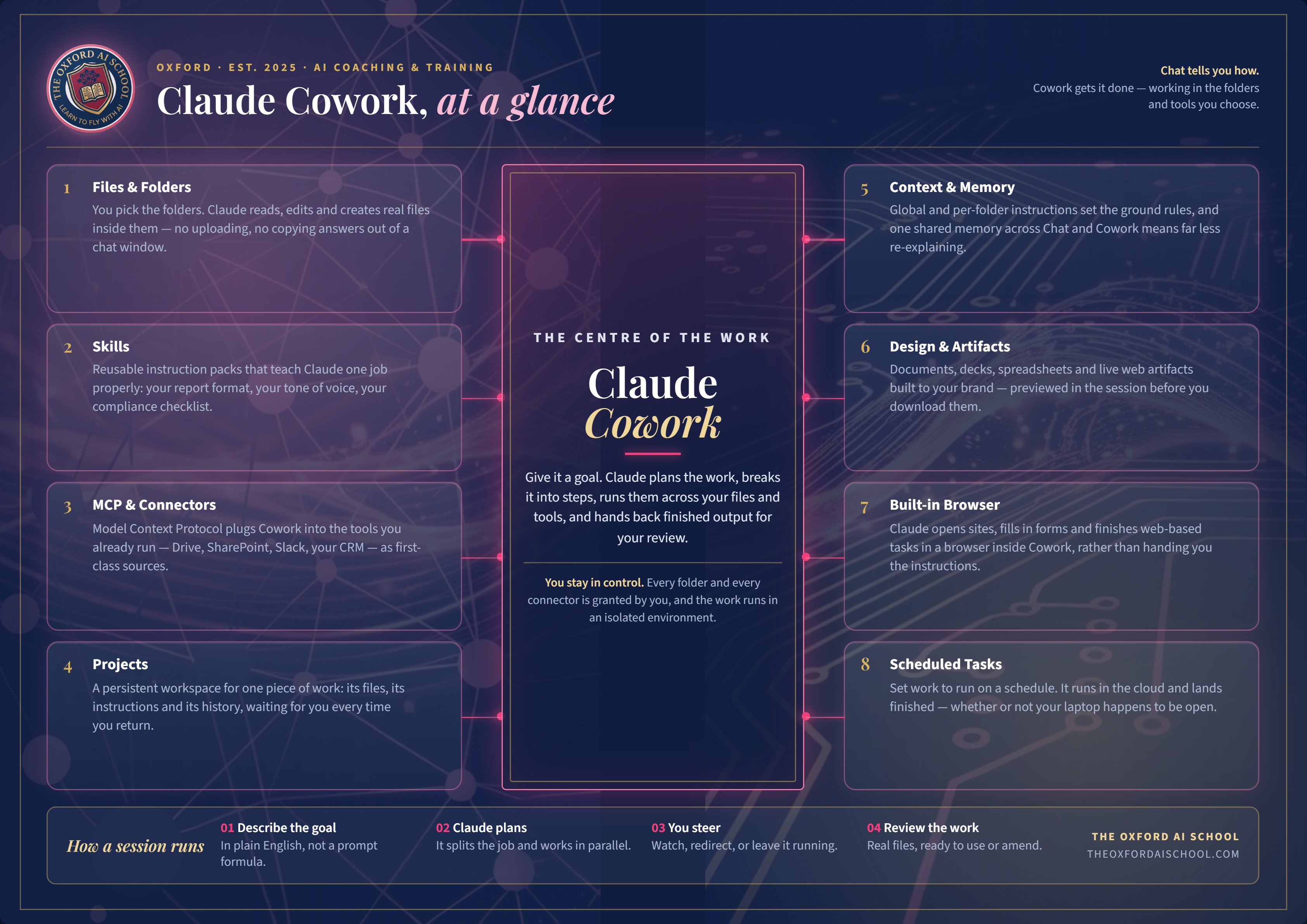
This is the big one, and it is what the infographic at the top of this page lays out. Cowork is the mode where Claude stops handing you answers and starts doing the work. You give it a goal in plain English, it plans the steps, works across your files and connected tools, and hands back finished output for you to check. It runs in the cloud, which means it keeps going whether your laptop is open, shut or in a bag on a train.
The mental shift is small but it changes everything. Chat tells you how to do the job. Cowork does the job. Underneath it sits a handful of parts worth knowing by name.
Files and folders
You choose which folders on your computer Claude can see, and it reads, edits and creates real files right there inside them. No uploading, no downloading, no copying answers out of a chat window and pasting them into a document. It works where your work already lives.
A good first job
Point it at that folder of a dozen slightly different monthly spreadsheets and ask it to merge them into one clean file. The kind of task you have been avoiding since roughly March.Context and memory
Global and per-folder instructions set the ground rules, and a shared memory across Chat and Cowork means you explain yourself far less often. Tell it once that you write in British English, in your tone, and never want it to sound like a robot, and that sticks.
A good first job
Write your standing instructions once, properly. Ten minutes now saves you repeating yourself for months.The built-in browser
Cowork has a browser inside it. Rather than handing you a numbered list of "now go and do this", Claude can open sites, fill in forms and finish web-based tasks itself, while you watch or get on with something else.
A good first job
A piece of tedious research across a handful of sites, pulled together into one tidy summary, rather than fourteen browser tabs you will forget to close.Scheduled tasks
You can set work to run on a schedule. It runs in the cloud and lands finished, whether or not you are at your desk, whether or not your laptop is even on. This is the part that starts to feel less like a tool and more like quietly having help.
A good first job
A Monday 7am digest of what matters for the week ahead, waiting for you before you have found the kettle.Claude Code: for the technical few
One honest line for completeness. Claude Code is the version of Claude that lives in a developer's terminal and can read, write and change whole codebases. If you build software, it is superb and you already know why. If you do not write code, you can skip this one entirely and lose absolutely nothing. It is on the menu, not on your plate.
So which one do I actually use?
Here is the sensible order for a normal human running a normal business:
The running order
- Start in Chat. Build the habit. Give it real drafting and thinking jobs and get used to being specific with it.
- Make one Project for a job you do every week, so it stops forgetting your context and you stop repeating yourself.
- Turn answers into Artifacts the moment you want something you can keep, edit and send.
- Connect one tool you live in, and give it a small real task there.
- Then try Cowork. Point it at a folder, hand it a genuine job, and let it work while you do something else.
You do not need to understand all of it before you start. You need to give it one real task and see what happens. Most people reach a properly useful working level within a few weeks. That is the whole secret, and there is no clever trick hiding underneath it.
Frequently asked questions
The questions people actually type, and the answers, if you would rather ask an AI than read a table.
What is Claude and who makes it?
What is the difference between Claude Chat and Claude Cowork?
What is a Claude Project and when should I use one?
What are Claude Artifacts?
What is a Claude Skill?
What are Connectors and MCP in Claude?
Do I need to know how to code to use Claude?
Which Claude feature should a small business start with?
Is my data safe when I connect Claude to my files and email?
Is Claude free, and what do the paid plans include?
Practical next steps
Put Claude to work with your team
We deliver practical AI training in Oxfordshire, London and across the UK, plus live online sessions for teams in the USA and other international markets. Sessions can be tailored for SME owners, directors, lawyers, doctors, nurses, teachers, estate agents, accountants and marketing teams.
Which Claude Do You Need?
Compare Claude Chat, Projects, Cowork and Code before choosing.
Explore this trainingIntroduction to Claude Code
Learn the practical first steps for coding and knowledge work.
Explore this trainingAdvanced Claude Code
Build stronger workflows once the basics are working.
Explore this trainingBuilding Agents in Claude Code
Learn how capable teams move from prompts to useful agents.
Explore this trainingCompare the other AI For Dummies guides: ChatGPT · Microsoft Copilot · Google Gemini · Perplexity.
The Oxford AI School
Rather be shown than left to work it out?
The people who get the most from Claude are not the cleverest or the most technical. They are the ones who stopped treating it as a novelty and started giving it real jobs. That is what we teach, in plain English, using your actual work.
So pick one thing. The dull job you have been putting off, ideally. Give it to Claude properly, context and all, and see what Tuesday looks like on the other side. That is the entire trick. Everything above is just knowing which door to open.