How To Use Claude Like A Pro · Part 3 of 6
How to Add Context to Claude
Give Claude the information the job needs. Your entire company archive can stay where it is for the moment.
Claude cannot read the document you meant to attach. This feels unreasonable when you are busy, but remains the arrangement.
Adding context to Claude means giving it the background needed for this job: the source material, audience, definitions and constraints. Good context saves explanation. Bad context gives the wrong answer a supporting cast.
What counts as useful context?
Context includes the material Claude should work from and the circumstances that give it meaning. A spreadsheet needs a date range, units and an explanation of its columns. A complaint needs the actual complaint and the relevant approved policy. A speech needs to know who is in the room.
I would write a short source note before uploading anything: “This is the approved service list dated [date]. Use it for current descriptions. The attached newsletter is an old style example only.” That small distinction can prevent an impressive amount of nonsense.
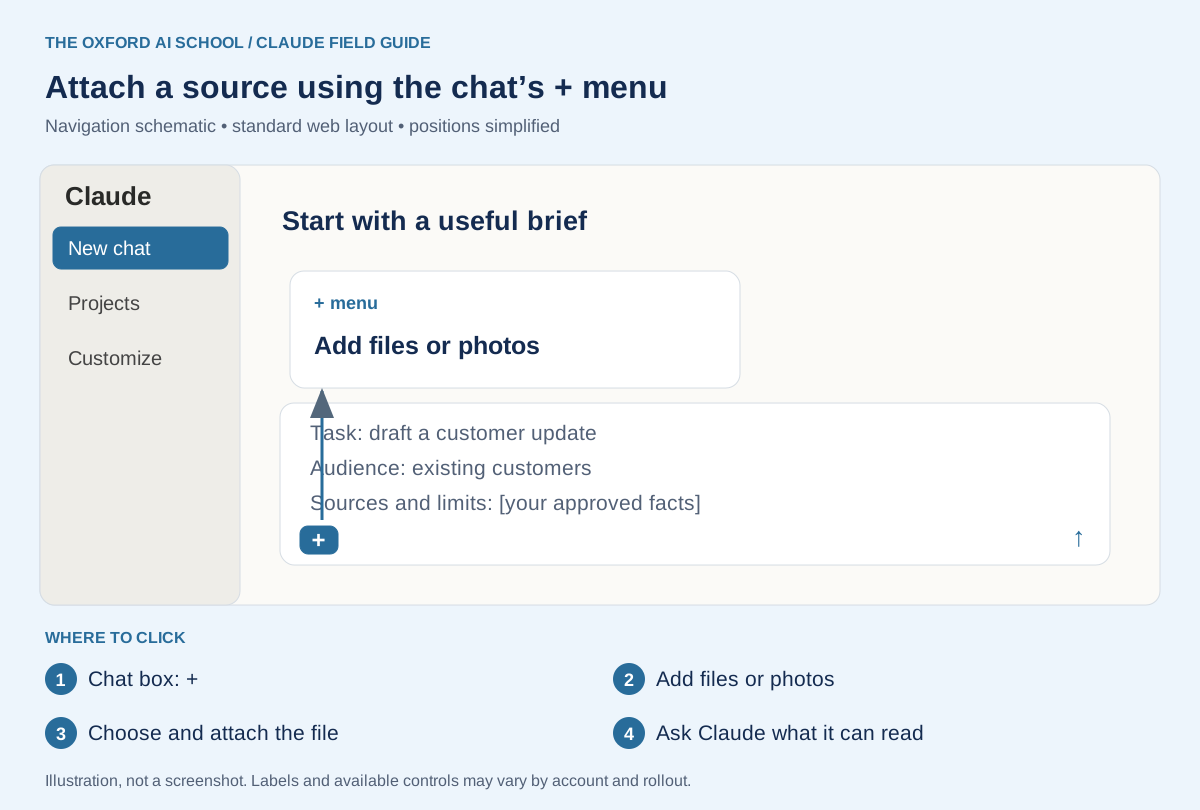
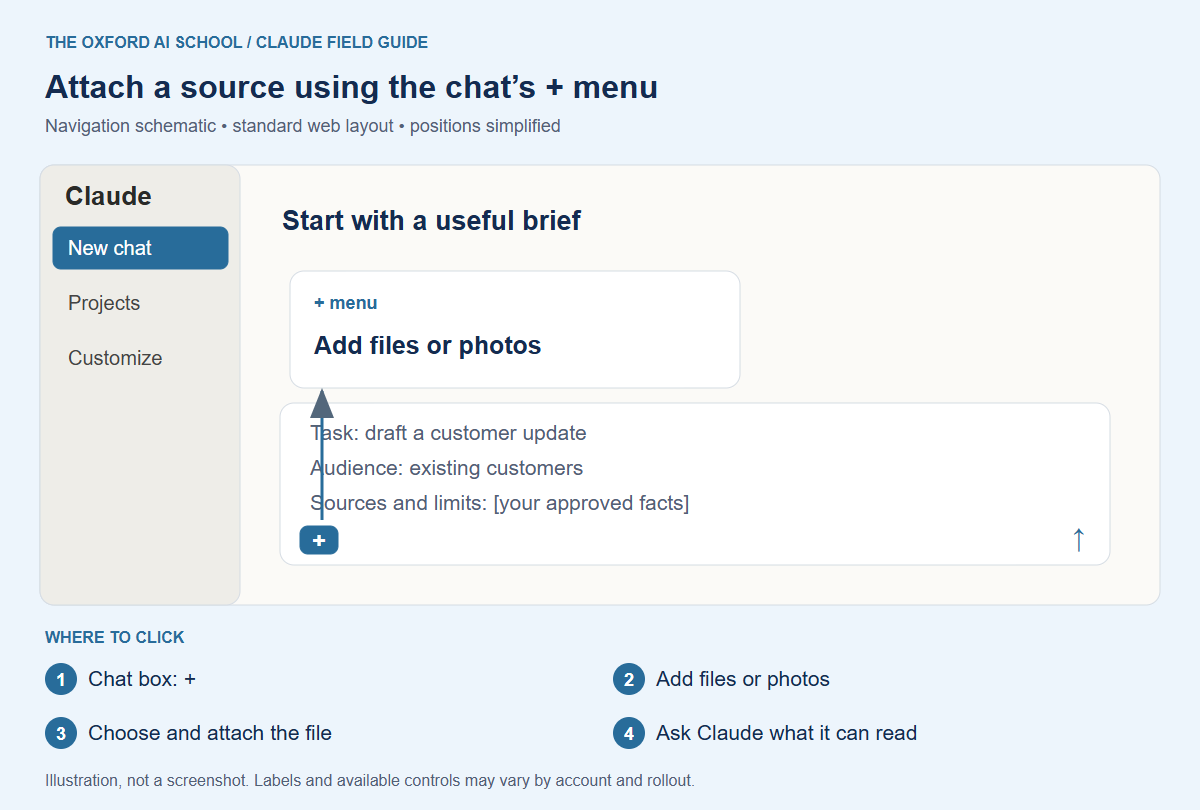
Chat box: + → Add files or photos → Choose and attach the file → Ask Claude what it can read
How do you upload files to Claude?
In the chat composer, select +, then Add files or photos, choose the file and attach it. Dragging a file into the chat is another option. Claude’s upload guide lists supported formats and current limits.
After attaching the file, name the task and ask for an inventory of the material it can use. Start with a passage or figure you can check. Do this before requesting the full report.
Documents can contain information Claude does not extract in the way you expect. Check diagrams and embedded images separately; non-PDF document processing extracts text rather than interpreting their embedded images. A file appearing in the chat is the beginning of the check.
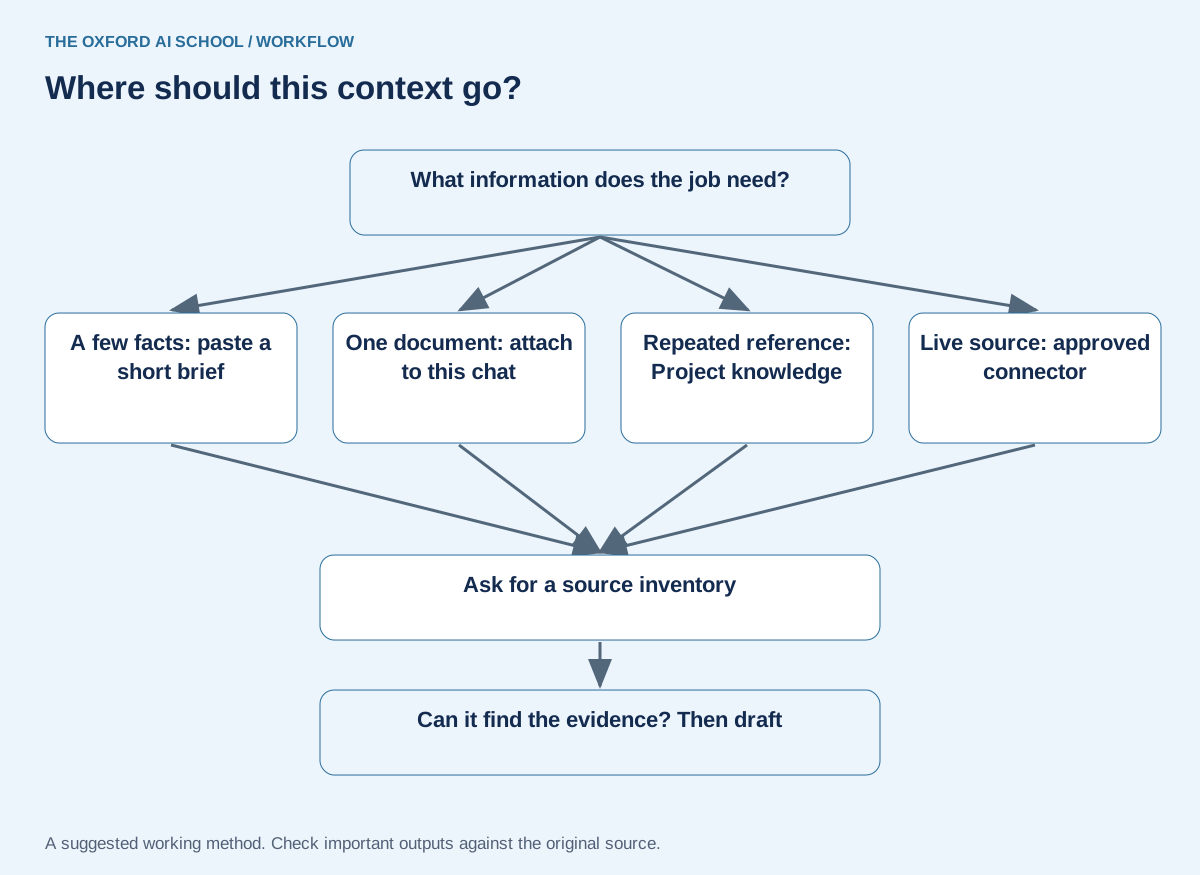
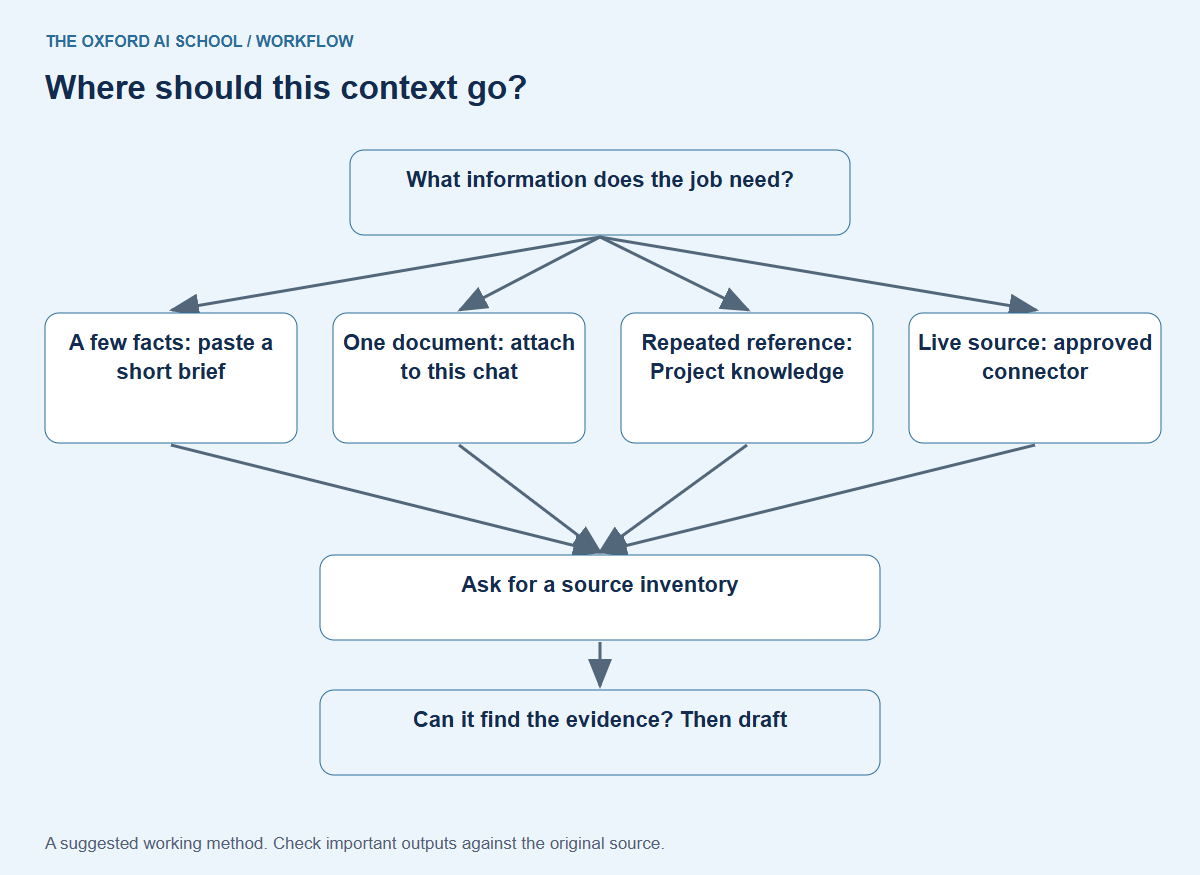
Read the flowchart as text
- What information does the job need?
- A few facts: paste a short brief
- One document: attach to this chat
- Repeated reference: Project knowledge
- Live source: approved connector
- Ask for a source inventory
- Can it find the evidence? Then draft
Chat attachment, Project or Connector: which should you use?
| Situation | My starting point | What to check |
|---|---|---|
| A short set of facts for one answer | Paste a labelled brief | Missing details and ambiguous dates |
| Analyse one supplied document | Attach it to the chat | Extraction, tables and relevant pages |
| Reuse approved background | Project knowledge | Version, ownership and outdated references |
| Find material in another service | An approved Connector | Source access, freshness and permissions |
Choose the route that fits the information. Re-uploading a static policy can be entirely sensible. Building an integration for a single paragraph may be taking the scenic route.
Build a context pack Claude can actually use
For a fictional customer update, I would supply a current service sheet, a short audience brief and one approved writing example. I would leave out unrelated sales decks and old meeting notes.
Label the authority of each source
Say which document controls factual claims and which merely illustrates style. If two policies disagree, ask Claude to identify the conflict rather than choose silently. You still need the appropriate person to resolve it.
Define the terms people inside the business take for granted
Explain abbreviations, product names and whether “customer” means current clients or prospects. A tool cannot infer your office shorthand reliably just because everyone at the kettle understands it.
Check the context before drafting
Before drafting, inventory the material available in this chat.
For each source, state its filename or label, date if shown, intended use and any access or extraction limitation you can identify.
Find the passage supporting [a fact you know is present]. Quote a short excerpt and give a page or section reference if available.
List conflicts and missing information. Do not draft yet.
Check it: Check the context before drafting
Compare the inventory and excerpt with the original. Do not assume an asserted absence means the information is absent.
What if the document or conversation is very long?
Give Claude a clear question and point to the relevant part. Break a complex review into stages: inventory, evidence table, analysis, then draft. Keep a short approved handover note containing the goal, decisions, unresolved questions and source versions.
If you begin a new chat, bring that note and the required sources with you. Do not rely on an old conversation being available in the precise way you expect. Project behaviour also varies between standard chat and the new beta described in the Projects guide.
More information is useful only when it improves the work. A filing cabinet emptied onto the floor has excellent coverage and terrible usability.
A practical exercise: give two sources different jobs
Use two fictional references. The current booking policy says: “Bookings can be changed up to 48 hours before the session.” An old newsletter says: “Change your booking any time before the morning of the session.” Label the first as current policy and the second as a style example.
Ask Claude which rule applies and where the references disagree. Then remove the authority labels and ask it to identify what needs resolving. The point is to see whether your context tells it which source controls the facts. A confident answer based on the older document is still the wrong answer.
Check source authority and conflicts
Compare these fictional sources before drafting anything.
SOURCE A — current approved booking policy: Bookings can be changed up to 48 hours before the session.
SOURCE B — old newsletter, supplied for tone only: Change your booking any time before the morning of the session.
Identify the conflict, state which source controls the booking rule and explain how Source B may be used.
Then list what you would need to know if neither source had a date or authority label.
Check it: Check source authority and conflicts
Expect the 48-hour rule from Source A. Source B may inform tone, but must not supply the booking rule. Without authority information, the conflict needs resolving.
Sources and product notes
Official documentation checked on 25 October 2026. This guide focuses on the Claude web app; availability, wording and organisation controls can differ. Examples and working methods are original teaching suggestions, with fictional practice material.
How to Add Context to Claude: frequently asked questions
What does context mean in Claude?
Context is the background and source material available for the task, including the brief, relevant conversation, files and enabled sources.
How do I attach a document to Claude?
Use the + menu in the chat composer, select Add files or photos and choose the file. Then explain what Claude should do with it.
Does typing a filename give Claude access to it?
No. Attach it, add it to the relevant Project or make it available through an appropriate connected source.
Should I paste text or upload a file?
Paste a short, well-labelled brief. Upload a longer document when its structure and source identity matter. Check that the relevant content is readable.
Does uploading a document train Claude permanently on it?
An upload supplies information for the product workflow; it is not the same as permanently teaching the underlying model. Review the current account privacy and data-use settings separately.
Can Claude read charts inside documents?
Support depends on format and processing. Check visual content explicitly against the original; embedded images in non-PDF documents are not interpreted through text extraction.
Why does Claude miss information in an uploaded file?
Possible causes include extraction problems, the wrong source or an unclear question. Ask for a known passage and inspect the original before diagnosing the cause.
How much context should I add?
Enough to support the job and resolve important ambiguity. Start with a small authoritative set, then add material when the task demonstrates a need.