How To Use Claude Like A Pro · Part 5 of 6
How to Add the Best MCPs in Claude
The best MCP is the one that solves a job you actually have. Collecting connections is not a business strategy.
MCP stands for Model Context Protocol. It is a connection standard that helps an AI application work with external tools and information. You will also hear people say “an MCP” when they mean an MCP server.
That explanation is less exciting than “a new era of autonomous productivity”, but it is considerably more useful when you are trying to find a customer brief.
Which MCPs are worth adding to Claude?
My shortlist starts with the systems you already use. These are job-based recommendations, rather than a claim that one provider is best for everyone. Availability and tool permissions change; inspect the current Claude directory before connecting.
| Your actual job | Where I would start | First test |
|---|---|---|
| Find a brief or policy | Google Drive or Microsoft 365 | Retrieve one known approved document |
| Use an internal knowledge base | Notion | Find and quote one known page |
| Turn decisions into tracked work | Asana or Linear | Read one known task before creating any |
| Work with technical documentation | Atlassian MCP | Retrieve a known issue or page |
| Find a discussion | Slack | Locate one known message and its date |
Pick one. If none addresses an actual problem, leave the settings alone and have a cup of tea. That can be a perfectly sound implementation decision.
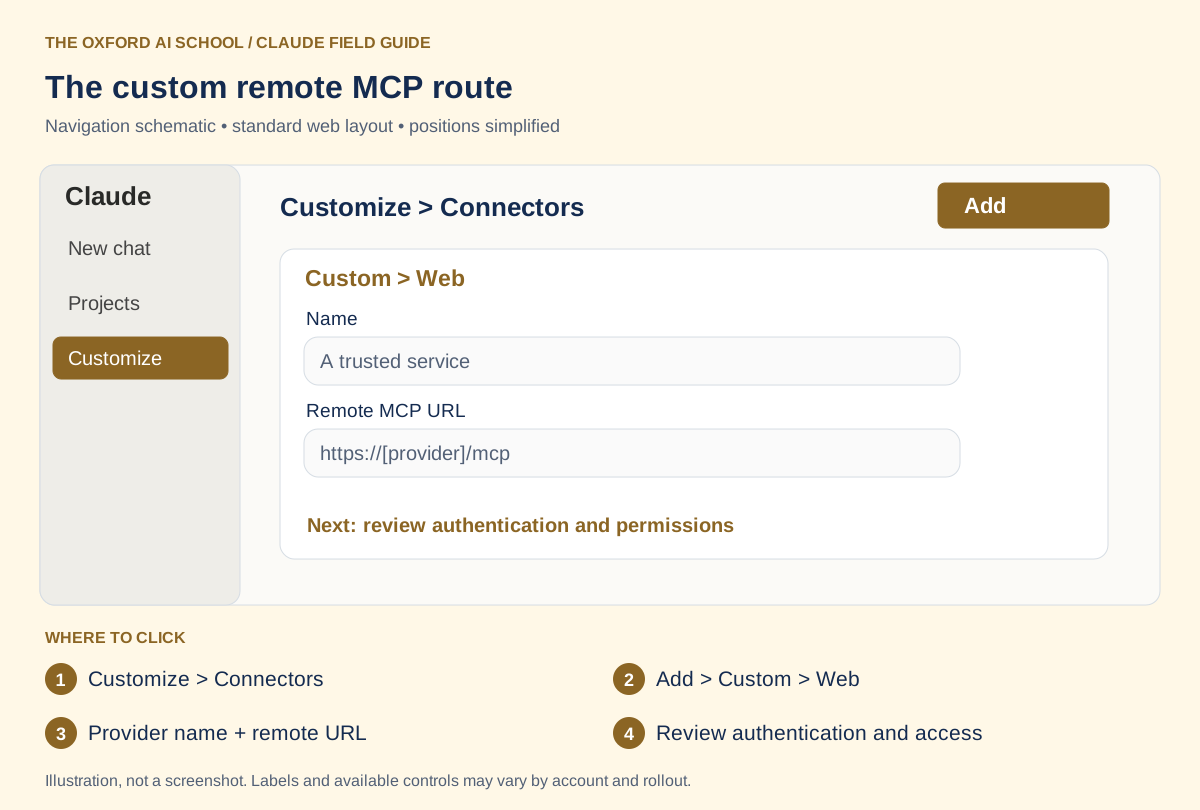
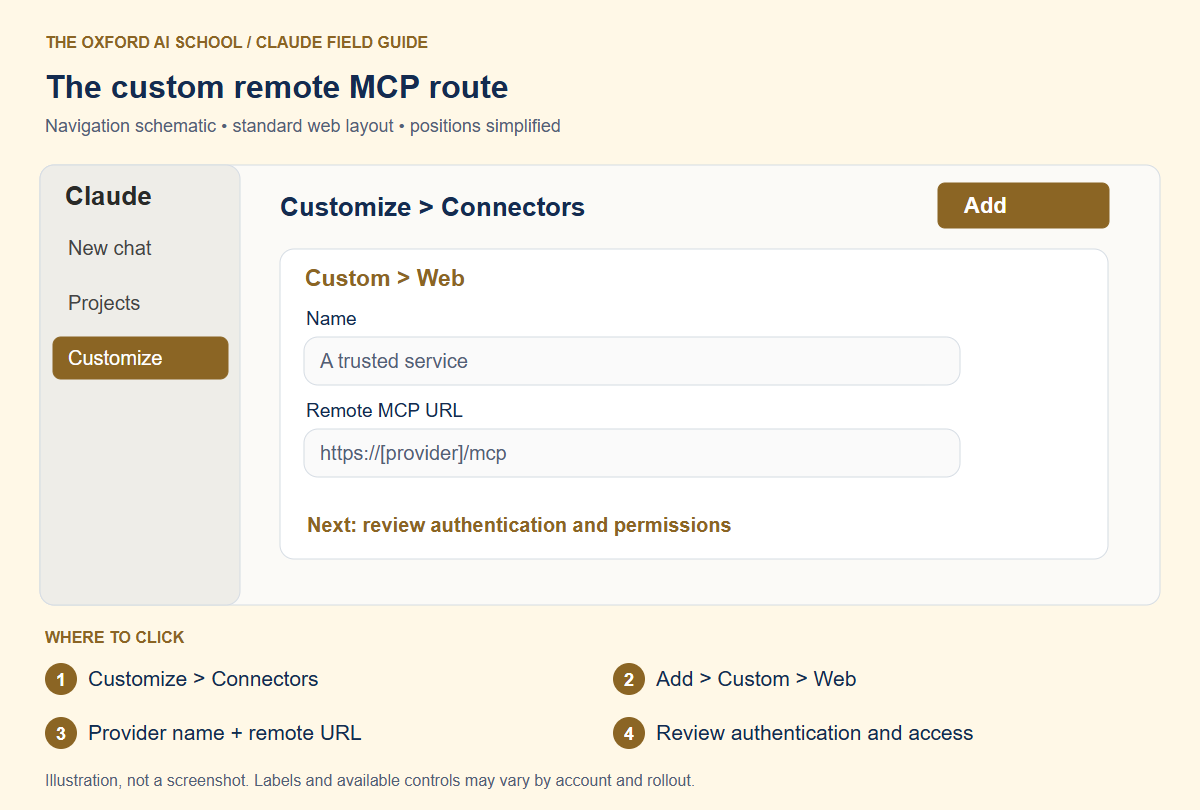
Customize > Connectors → Add > Custom > Web → Provider name + remote URL → Review authentication and access
Remote MCP and local MCP are different routes
A remote MCP server runs at an internet-accessible address. Claude’s custom web Connector connects from Anthropic’s infrastructure. A server reachable only from your laptop or private VPN is not automatically reachable by that route. Check the remote MCP guide for your setup.
Local MCP servers in Claude Desktop use a different mechanism. Do not paste a local configuration file into the web Connector form or assume Desktop configuration applies to claude.ai. This page focuses on the remote route; ask your technical owner to handle local installation and dependencies.
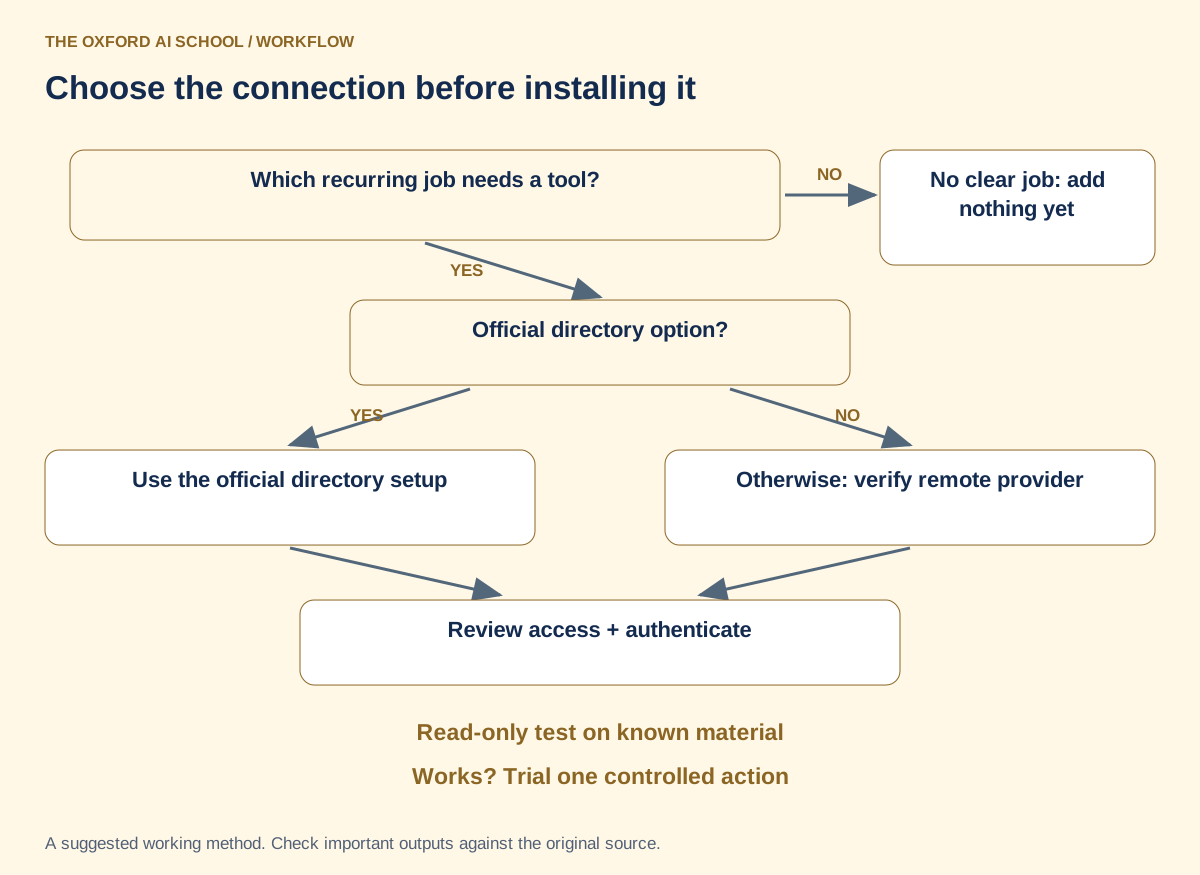
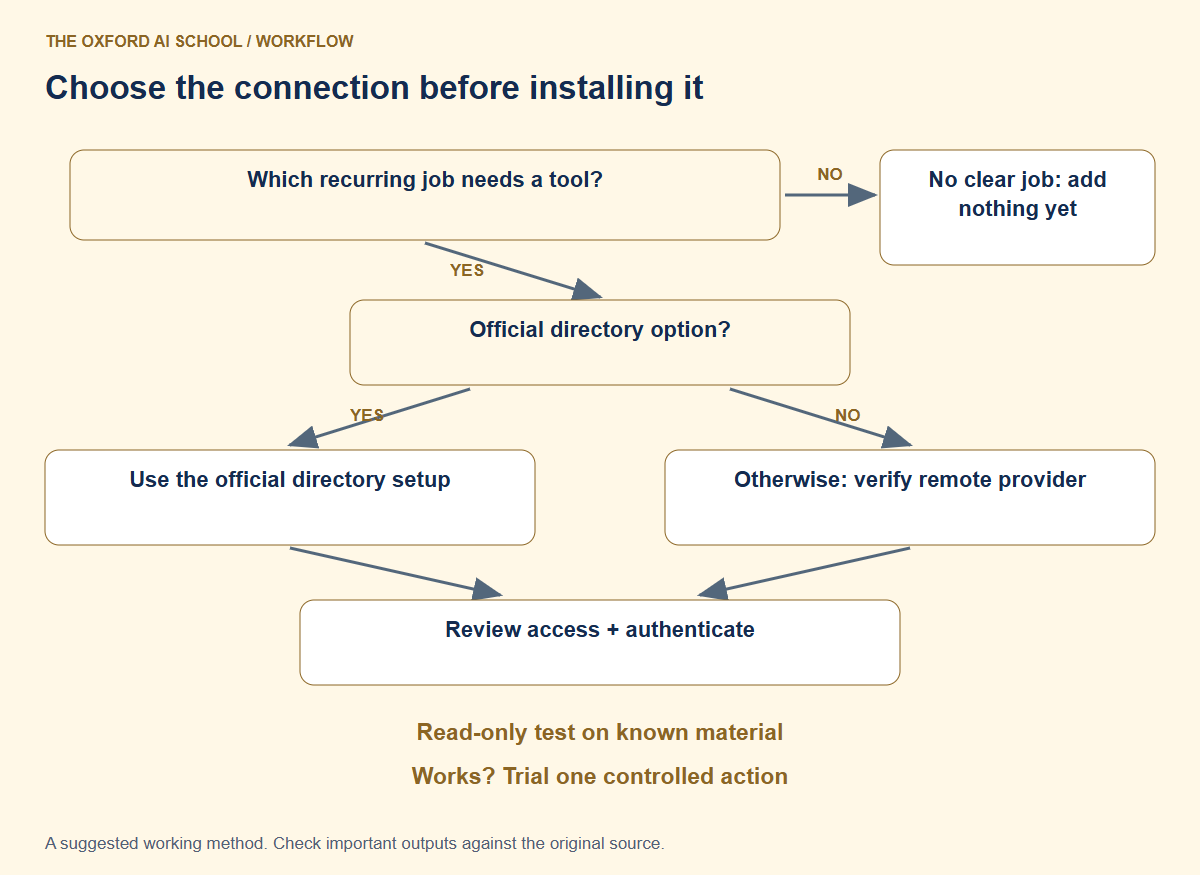
Read the flowchart as text
- Which recurring job needs a tool?
- No clear job: add nothing yet
- Official directory option? Use it
- Otherwise: verify remote provider
- Review access + authenticate
- Read-only test on known material
- Works? Trial one controlled action
How do you add a custom remote MCP server?
- Check the provider’s official documentation and whether a directory Connector already covers the job.
- Open Customize > Connectors, choose Add, then Custom > Web. Some layouts show Add custom connector.
- Enter a recognisable name and the provider’s current remote MCP server URL.
- Review the detected authentication setup, follow the connection prompts and inspect requested access.
- Enable the connection for the intended conversation and run a known read-only test.
Organisation accounts may require an owner to add the service first. Use the authentication method documented by the provider; do not paste secrets into chat messages. A random URL copied from a comment thread is a poor foundation for access to company systems.
A concrete example: use a known Notion page
The official Notion Connector page lists the remote server address https://mcp.notion.com/mcp. Prefer its directory setup when available and verify the live listing before adding it manually.
For a first test, create a fictional page called “Practice supplier brief” in a workspace you are authorised to use. Give it a distinctive sentence. Ask Claude to retrieve that exact page, identify its source and quote the sentence. Compare the result with Notion.
This checks the connection on something you can verify. It does not prove every page is accessible or every action will behave correctly.
Read before you let it write
Using the enabled Notion connection, find the page titled “Practice supplier brief” in [the intended workspace].
Report its title and source link, then quote the sentence containing [distinctive phrase].
Do not create, edit, move or delete anything. If the page is inaccessible or ambiguous, explain that and stop.
Check it: Read before you let it write
Open the source link. Confirm the workspace and wording before trying any write action.
Decide which actions the connection needs
Searching a document and changing a document are different permissions and different decisions. Begin with retrieval. If the real job needs writing, try one reversible action on fictional material, then inspect the result in the source service.
For example, draft one proposed task in chat. Confirm its title, owner and date before asking for creation. Do not begin with “tidy our workspace”. That instruction is short because it has delegated all the difficult decisions.
Review actual connection controls and source permissions. A request to behave cautiously is helpful, but it is not a substitute for the access settings.
What to check when an MCP connection fails
Check the account, provider URL, authentication, organisation approval and whether the server is reachable through the route you chose. Separate “cannot connect” from “can connect but cannot access this item”. Those are different problems.
If access works but the result is wrong, inspect the source selection and the prompt. Reconnecting will not repair an ambiguous question. Keep a small log of the known test, result and remaining problem so the next person does not start from “it’s broken”.
Keep the connection only if it improves a complete job, including checking time. A clever demonstration is a starting point. A repeatable useful result earns its place.
Sources and product notes
Official documentation checked on 25 October 2026. This guide focuses on the Claude web app; availability, wording and organisation controls can differ. Examples and working methods are original teaching suggestions, with fictional practice material.
How to Add the Best MCPs in Claude: frequently asked questions
What does MCP stand for?
MCP stands for Model Context Protocol, a standard for connecting AI applications to tools and data sources.
What are the best MCPs for Claude?
Start with the official connection to the system where your work lives: documents, knowledge, tasks or discussions. Test one relevant job before adding more.
Is an MCP the same as a Connector?
MCP is the connection standard. A Connector is the product-level way Claude makes a service available; many use MCP underneath.
Can I add MCP servers to Claude on the web?
Trusted remote servers can be added through custom web Connectors, subject to account and organisation controls. Local servers use a separate Desktop mechanism.
Can I use a localhost URL as a remote Connector?
Not as though it were publicly reachable. Remote connections originate from Anthropic’s infrastructure, so your laptop’s localhost is not the remote server address.
Where should I get an MCP server URL?
Use the provider’s official documentation or verified directory listing. Check its current authentication and supported clients.
Should I enable every available tool?
Enable only what the job needs. Start with reading known material and test write actions separately with appropriate permissions.
Why does Claude connect but fail to find my file?
Check the signed-in service account, workspace, item permissions and the exact source request. Successful authentication does not establish access to every item.