My book, Learn To Fly With AI, was illustrated by Google Gemini. Not because it was easy, but because I learned the one thing every image generator teaches you in the first hour: your first result is a draft, and the skill is in the second, third and eleventh.
AI image prompting means describing a picture in words so a generator can draw it. Good prompts name the subject, style, composition, colour and any text or space needed, then improve through iteration: change one thing per round. Tools differ in strengths, so test your prompt in more than one before settling.
This page covers prompting for illustrations, graphics and social images. If you want realistic photography, go to the best AI photo prompts. Both share the same loop.
How does AI image prompting work?
An image generator turns your words into a picture by predicting what image would match them. It cannot read your mind, so everything you leave out, it fills in with the most average version available. That is why unspecified images look generic.
You steer by being specific on five things: what is in it, what style it is in, how it is arranged, what colours it uses, and what it must not contain.
The loop that gets you to the right image
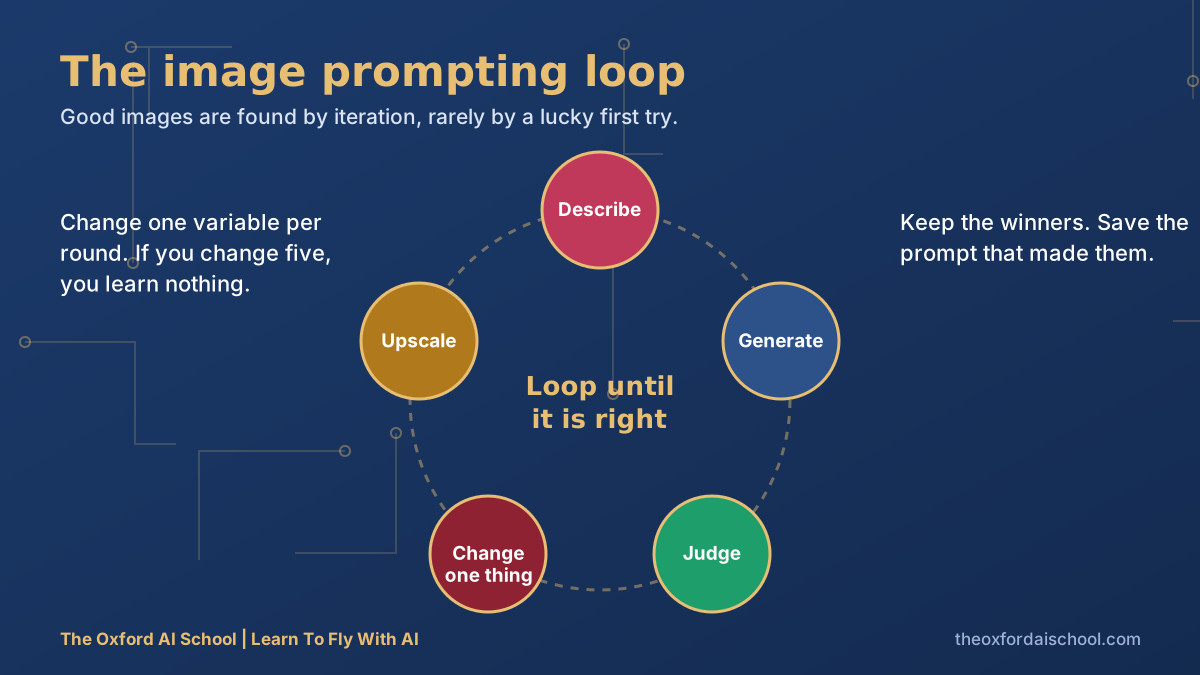
- Describe. Write the prompt in a sentence or two. Do not stop at the subject.
- Generate. Make several, not one.
- Judge. What is right? What is wrong? Write it down in one line each.
- Change one thing. Light, colour, composition or style. Only one.
- Upscale and tidy. Enlarge the winner, fix small details, and save the prompt that made it.
The five levers of an image prompt
Subject and action
'A paper aeroplane' is a subject. 'A paper aeroplane climbing out of a stack of paperwork' is a picture.
Style and medium
Flat vector illustration, gouache, pencil sketch, 1950s travel poster, clean infographic. Name the medium, not a living artist.
Composition
Close-up, wide shot, from above, centred, rule of thirds, empty space on the left for text.
Colour
Give three or four colours, or point to a real palette, such as navy, gold and one raspberry accent.
Exclusions
Some tools have a dedicated way to exclude things, and others expect you to say it in the sentence. Either way, name what you do not want: no text, no extra fingers, no logos.
Illustration prompts to copy
Flat explainer illustration
Flat vector illustration of a small team around a table watching a paper aeroplane take off from a laptop, navy, gold and raspberry palette, clean shapes, no text, generous empty space at the top, friendly and slightly witty
Hand-drawn feel
Pencil and watercolour sketch of a village high street in the rain, gentle muted colours, loose linework, a red bus in the distance, paper texture visible
Social post background
Soft gradient background in deep blue to warm gold, subtle circuit-board pattern in the corners, large calm empty space in the centre for a headline, square crop
Why it works: designing for the text you will add later saves a fiddly edit.
Icon set
Set of six simple line icons on a white background: lightbulb, calendar, envelope, magnifier, chart, speech bubble. Consistent 3px stroke, rounded ends, navy colour, no shading
Which AI image tool should you use?
They change fast, so treat this as a snapshot and test your own prompts. Tool features and pricing shift, so check each one's current terms.
| Tool | Often chosen for | Worth knowing |
|---|---|---|
| Midjourney | Rich, stylised imagery | Uses parameters, such as aspect ratio, after the prompt text |
| ChatGPT image generation | Conversational edits, readable text in images | You can refine by chatting |
| Google Gemini | Quick, conversational creation and edits | Illustrated my book |
| Adobe Firefly | Commercial work inside Adobe tools | Adobe states it trains on licensed content; check current terms |
| Leonardo AI | Controls and style models | Good for iterating a look |
Can you use AI images commercially?
- Read your tool's terms. Commercial rights vary by plan and change.
- Do not name living artists to copy their style, or ask for real people's faces.
- Avoid copyrighted characters and brand logos.
- Be honest in advertising: the picture must not mislead about the product.
- UK copyright law around AI is still developing. For anything high-stakes, ask a solicitor.
None of this is legal advice. It is the checklist I would want a colleague to run before publishing an AI-made image.
Need better wording for any of it? Try the best AI prompt generators, or fix the foundation with how to get started with prompting.
Want your images to move? How to prompt AI video uses the same habits with a six-part shot formula.
AI image prompting: frequently asked questions
What is AI image prompting?
AI image prompting is writing a description that tells an image generator what to create. Good prompts name the subject, style, composition, colour and exclusions, then improve through repeated, one-change-at-a-time iteration.
How do I write a good AI image prompt?
Describe the subject and action, the style and medium, the composition, the colours, and anything to exclude. Then generate several versions, judge them, and change one variable at a time.
Which AI image generator is best?
No single winner. Midjourney, ChatGPT, Gemini, Firefly and Leonardo each have strengths, and they update often. Test your prompt in two or three.
Can I put text in an AI image?
Some tools now render short text reasonably well, but it is still worth checking carefully. For reliable text, leave space in the image and add the words in a design tool.
Is it legal to use AI-generated images?
Generally you can use them subject to the tool's terms, but avoid imitating living artists, real people's likenesses, copyrighted characters and logos. UK law is still evolving, so take advice on anything high-stakes.
How do I keep a consistent style across AI images?
Reuse the same style sentence in every prompt, keep a fixed colour palette, and save your best prompts. Some tools also let you reference an earlier image to keep a look.
Harry Lang runs The Oxford AI School in Witney, Oxfordshire. A former CMO, he now teaches teams and individuals across the UK to use AI in plain English, on their own real work. Email Learn@TheOxfordAISchool.com.