Type beautiful photo of a baker, stunning, 8k, high quality into an image generator and you will get a beautiful baker with an extra thumb, lit like a perfume advert. The generator has no idea what you meant by stunning. It does know what a 35mm lens looks like.
The best AI photo prompt describes the shot the way a photographer would: subject, setting, light, lens, mood and finish, in plain sentences. Specific light and lens words beat vague praise like 'stunning' or 'high quality'. Write one clear scene, then change one detail at a time until the image is right.
That is the whole secret. Stop describing how you want the picture to feel. Describe what the camera would see. For the wider picture, including illustration and editing, read our AI image prompting guide.
What is the best formula for an AI photo prompt?
Six parts. You do not need all six every time, but when a result disappoints you, one of them is usually missing.
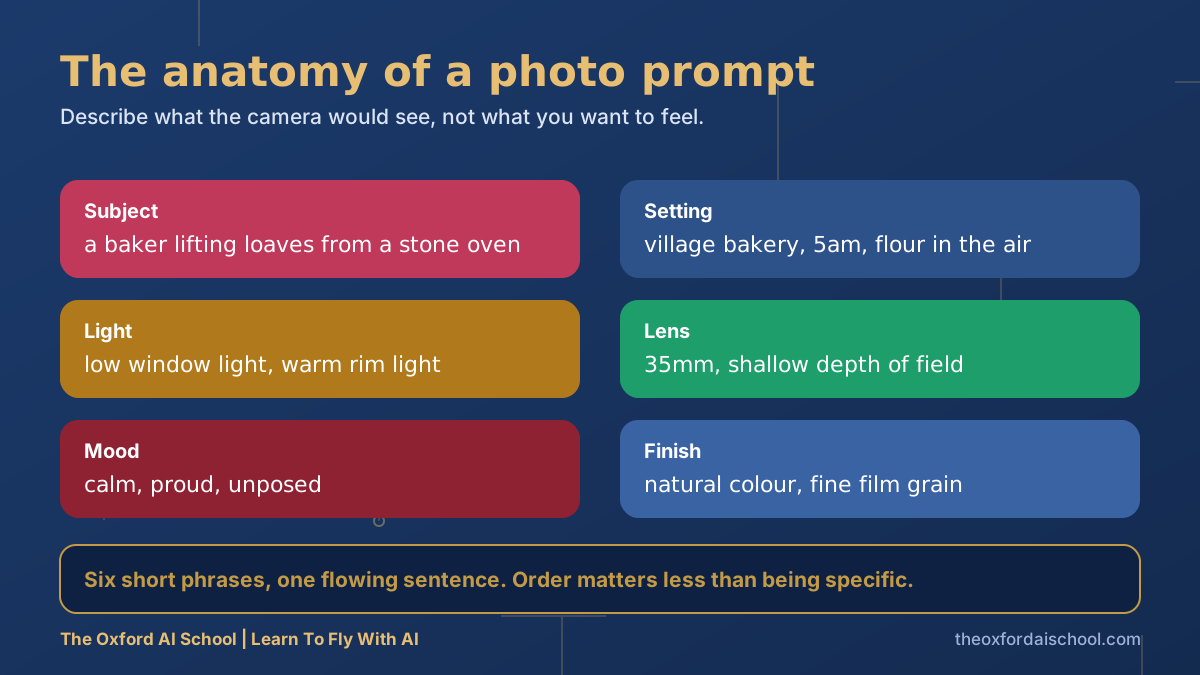
- Subject. Who or what, doing what. Concrete verbs beat adjectives.
- Setting. Where, and when. 'Village bakery, 5am' does more than 'rustic'.
- Light. The single biggest difference between amateur and professional-looking images.
- Lens. Focal length and depth of field. It controls how close and how blurry.
- Mood. Two or three honest words: calm, proud, unposed.
- Finish. Colour treatment and grain.
A cheat sheet of lens and lighting words
Lenses
| Say this | You get | Good for |
|---|---|---|
| 24mm, wide angle | Big scene, stretched edges | Interiors, property, landscapes |
| 35mm | Natural, documentary feel | Street, people at work |
| 50mm | Close to how the eye sees | Everyday, food, general |
| 85mm, shallow depth of field | Flattering, blurred background | Portraits, products |
| Macro | Extreme close detail | Jewellery, food, textures |
Light
| Say this | You get | Good for |
|---|---|---|
| Golden hour, low sun | Warm, long soft shadows | Landscapes, portraits |
| Overcast, soft daylight | Even, shadow-free | Products, faces |
| Hard midday sun | Strong contrast, crisp shadows | Bold, graphic, holiday feel |
| Window light from the left | Gentle directional shape | Interiors, food, portraits |
| Blue hour with warm windows | Moody, cinematic | Street, property exteriors |
Ten AI photo prompts to copy
1. The product on a shelf
A ceramic coffee mug in matte green on a pale oak shelf, morning window light from the left, soft shadows, 85mm lens, shallow depth of field, calm and minimal, natural colour, no text, no logos
2. The working portrait
A woman in her forties, joiner, holding a spirit level in a sunlit workshop, sawdust in the air, side window light, 50mm lens, confident and unposed, natural skin texture, subtle film grain
Why it works: 'natural skin texture' stops the waxy look. Always use fictional people, never a real person's likeness.
3. The bakery
A baker lifting loaves from a stone oven, village bakery at 5am, flour in the air, low window light with warm rim light, 35mm lens, shallow depth of field, calm and proud, natural colour, fine film grain
4. The flat lay
Top-down flat lay of a notebook, black coffee, pencil and a paper plane on a navy linen cloth, overcast soft daylight, 50mm lens, tidy but lived-in, muted palette with one warm accent
5. The property
Interior of a bright Victorian terrace living room, bay window, pale walls, oak floor, a worn leather armchair, afternoon sun across the floor, 24mm lens, straight vertical lines, natural colours, no people
Why it works: 'straight vertical lines' is the estate agent's fix for converging walls.
6. The event
A crowd laughing at a small business workshop in a bright converted barn, people facing a presenter off-frame, 35mm lens, candid, warm daylight through large doors, slight motion blur on hands
7. The coastal landscape
A shingle beach on the Dorset coast at golden hour, low sun behind the cliffs, long shadows on wet pebbles, 24mm lens, wide scene, calm sea, natural colour
8. The street at dusk
A narrow Oxford lane at blue hour, warm light from windows, wet cobbles reflecting, one cyclist in the distance, 35mm lens, quiet and atmospheric, subtle grain
9. The headshot background
Empty soft grey studio backdrop with gentle gradient, even soft light from camera left, no subject, space on the right for a person to be placed, 85mm lens look
10. The social square
A single glass of orange juice on a sunlit windowsill, condensation visible, bright airy morning light, 85mm lens, shallow depth of field, centred composition, square crop, plenty of empty space at the top for text
Why it works: reserving space for text in the prompt saves you cropping later.
Why do AI photos still look fake sometimes?
- Too many glamour words. 'Stunning, perfect, flawless' pushes towards plastic. Ask for natural texture instead.
- Over-lit. If you do not specify light, you often get studio-bright everything. Say where the light comes from.
- Hands and text. Both are better than they were, but still worth checking carefully. Add text in a design tool, not in the prompt.
- Too many ideas. One scene per image. Combine them in an editor.
AI images used in advertising still have to be honest. A generated picture of a product that does not look like the real product is misleading, whatever made it. If you use real people's likenesses or imitate a living artist's style, you are in murky legal and ethical territory. Stick to fictional subjects and check the terms of your image tool.
Want the full workflow, with iteration, editing and tool choices? Head to AI image prompting, or learn how to put the right words in with prompt frameworks.
Using the pictures on social media? Our guide to AI tools for social media marketing picks up where this one stops.
Best AI photo prompts: frequently asked questions
What is the best AI photo prompt?
The best AI photo prompt describes the shot like a photographer: subject, setting, light, lens, mood and finish, in plain sentences. Specific light and lens words work far better than praise words like stunning or high quality.
How do I make AI photos look realistic?
Specify natural light and its direction, a realistic lens such as 35mm or 85mm, natural skin and material texture, and a calm, unposed mood. Avoid piling on glamour words.
What lens should I put in an AI photo prompt?
Use 24mm for interiors and landscapes, 35mm for documentary scenes, 50mm for everyday looks, and 85mm with shallow depth of field for portraits and products.
Can I use AI photos commercially?
It depends on your tool's terms and on what the image shows. Check the licence, avoid real people's likenesses and living artists' styles, and never use an image that misrepresents a product.
Why do my AI photos look fake?
Usually because the prompt leans on adjectives and does not describe light, lens or texture. Describe what a camera would see and change one detail at a time.
Which AI tool is best for photos?
Several are strong and they change often. Test your prompt in two or three, and see our AI image prompting guide for how they differ.
Harry Lang runs The Oxford AI School in Witney, Oxfordshire. A former CMO, he now teaches teams and individuals across the UK to use AI in plain English, on their own real work. Email Learn@TheOxfordAISchool.com.