There is a small, slightly funny irony in asking an AI to write your prompt for the AI. It works anyway. Often better than you would on a tired Thursday.
The best AI prompt generators fall into three types: built-in tools from AI companies, such as the prompt generators in Anthropic's Console and OpenAI's Playground; standalone prompt apps; and simply asking the AI to interview you. The interview method is free, needs no new tool, and teaches you the most. Use a generator for speed, then edit the result.
But not all prompt generators deserve your time. I have tried most of them, and they sort into three types. Pick the right type and you save ten minutes a day. Pick the wrong one and you collect a folder of identical, beige prompts.
What is an AI prompt generator?
A prompt generator takes a rough idea and turns it into a structured prompt. Type 'help me write a newsletter', and it hands back a longer prompt with a role, context placeholders and a format. You then paste that into your AI tool.
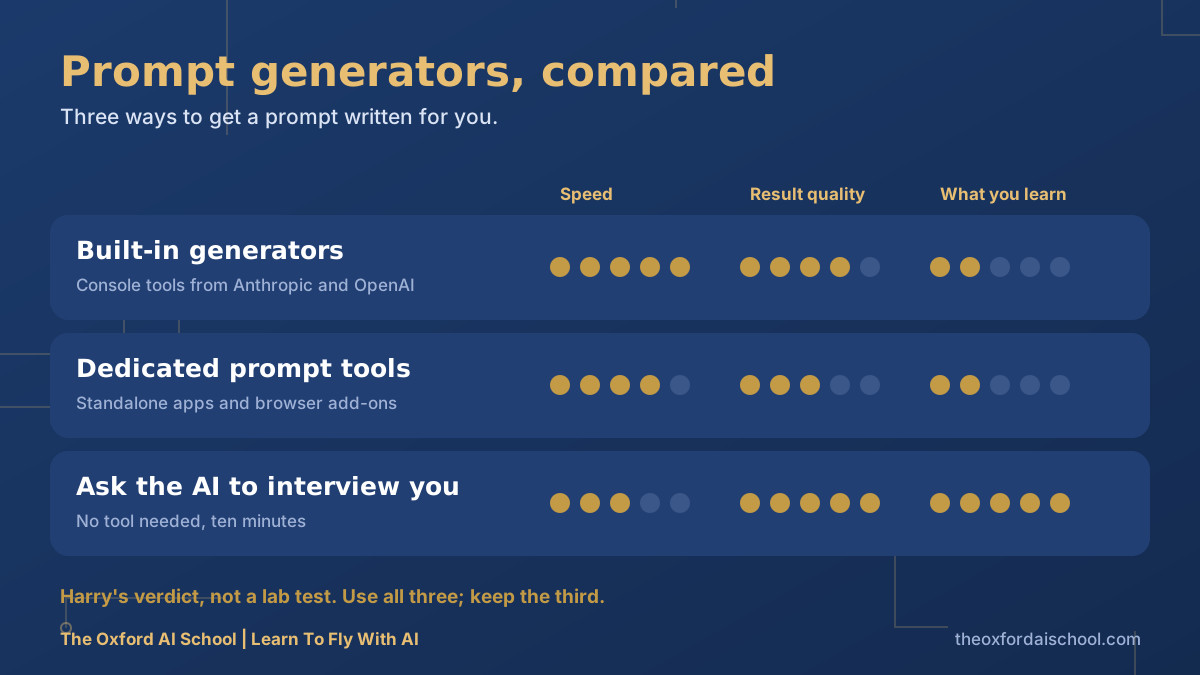
Type 1: built-in generators from the AI companies
Some AI providers build prompt-writing help into their own tools. The Anthropic Console has a prompt generator and a prompt improver for developers and power users, and the OpenAI Playground has a similar generate feature. Interfaces and names change, so check what your account offers today.
- Good at: well-structured prompts written by people who know how the model behaves.
- Less good at: being friendly. They assume you know what a system prompt is.
- Best for: prompts you will reuse many times, such as an assistant's standing instructions.
Type 2: standalone prompt generators
Dozens of websites and browser add-ons promise better prompts. Tools such as PromptPerfect sit here. Some are genuinely clever. Many are a template with a logo.
- Good at: speed, and convenience if you hate a blank page.
- Less good at: knowing your business. A generic generator writes a generic prompt.
- Watch out for: where your text goes. If you would not paste it into a stranger's inbox, do not paste it into a stranger's tool.
Type 3: ask the AI to interview you
This is the one I use, and it costs nothing. You tell the AI what you want, then ask it to quiz you until it has enough to write the prompt. It teaches you what a good brief contains, because it keeps asking for the thing you left out.
The interview prompt
I want you to write a prompt for me. The task is: [rough description].
Before you write it, interview me. Ask one question at a time about: who the output is for, what I already have, what good looks like, what to avoid, and what format I need.
After six questions, write the prompt. Then list any assumptions you made, so I can correct them.
Why it works: the questions force you to say the things you assumed were obvious, which is where most weak prompts go wrong.
A checklist for judging any generated prompt
- Does it say who the AI should be and who the output is for?
- Is every placeholder filled with something real?
- Is there exactly one task?
- Does it specify a format and length?
- Is there a line saying what to do when unsure?
- Could you hand it to a human colleague and have them know what to do?
If you answered no to two or more, edit before you use it. Generated prompts are drafts. Always read what the machine has written you.
Prompt generators for images
Image tools are where generators earn their keep, because the vocabulary of lenses, lights and styles is a lot to remember. Ask your text AI to turn a rough idea into a detailed image prompt, then paste it into the image tool. Our guides on photo prompts and image prompting give you the structure to check it against.
Image prompt generator
Turn this idea into a detailed prompt for an AI image generator: [idea].
Give me three versions: realistic photograph, flat vector illustration, and hand-drawn sketch.
For each, specify subject, setting, light or colour palette, composition and what to exclude. One paragraph each.
So which should you use?
| Your situation | Use | Why |
|---|---|---|
| You will reuse the prompt daily | A built-in generator, then edit | Quality and structure matter most |
| You are stuck on a blank page | A standalone tool, or the interview prompt | Speed to a first draft |
| You want to get better at prompting | The interview prompt | You learn the pattern |
| Anything involving confidential data | Your approved AI tool only | Do not paste it into random websites |
Every generator, free or paid, produces prompts that need your judgement. If you find yourself relying on one for every single task, spend an hour on prompt frameworks instead. It is the cheaper fix.
Rather learn to write them yourself? AI prompt engineering: top 10 tips has ten before-and-after examples.
Best AI prompt generators: frequently asked questions
What is the best AI prompt generator?
The best prompt generator depends on the job. Built-in generators from AI providers suit reusable prompts, standalone tools suit quick drafts, and asking the AI to interview you is free and teaches you the most.
Are AI prompt generators worth it?
Yes, for speed and for getting past a blank page, as long as you edit the output. They are weaker at knowing your specific business, so add your real context.
Is there a free AI prompt generator?
Yes. Many AI providers include prompt-writing help, and you can use any chatbot to interview you and write the prompt for free. Free tiers and limits change, so check current terms.
Is it safe to use prompt generator websites?
Be careful. Anything you paste goes to that service, so do not paste confidential or personal data into tools you have not vetted. Use your approved AI tool for sensitive work.
Can ChatGPT or Claude write prompts for me?
Yes. Ask either to interview you about your task and then write the prompt, or to improve a prompt you already have. It is one of the best uses of both.
Do I still need to learn prompting if I use a generator?
Yes. You need to judge and edit what the generator gives you. A few hours learning the basics saves far more time than any tool.

Harry Lang runs The Oxford AI School in Witney, Oxfordshire. A former CMO, he now teaches teams and individuals across the UK to use AI in plain English, on their own real work. Email Learn@TheOxfordAISchool.com.