Think of the last thing you explained to Claude for the fourth time. Your house style. How you format a proposal. The three things your quote must always include. You typed it out, got a good result, and the next day did it all again.
A Claude Skill is a folder containing a SKILL.md file of instructions, plus optional scripts and reference files, that Claude loads when your request matches it. The best Skills capture work you repeat: your tone of voice, your proposal format, your checklist. Write the instructions once and Claude follows them every time.
A Skill is the cure for that. It is the difference between telling a new starter how things work every morning and handing them the handbook once.
What is a Claude Skill?
A Claude Skill is a folder. Inside is a file called SKILL.md, containing a short name, a description of when to use it, and the instructions themselves. It can also hold scripts, templates and reference files. Claude reads the short description first, and only opens the rest when your request matches.
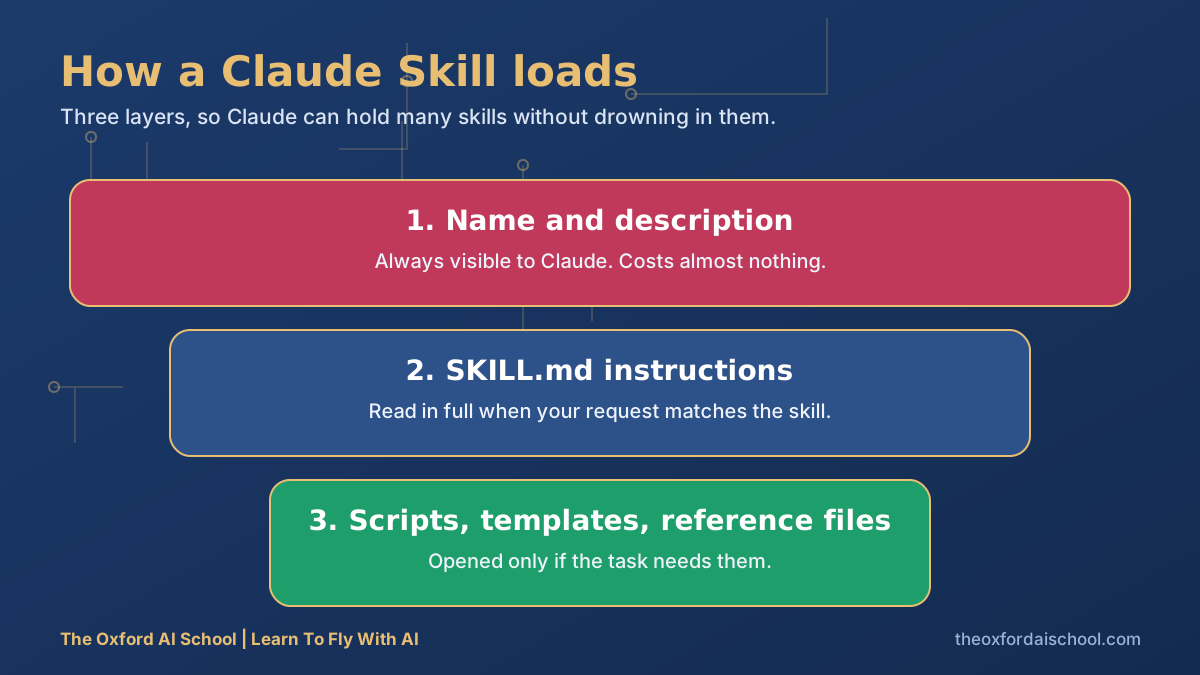
Anthropic provides built-in Skills for working with documents such as Word, PowerPoint, Excel and PDF files, and you can add your own. Availability and setup differ by plan and by product, so check Anthropic's current documentation before you plan around it.
Skills vs prompts vs Projects: which do you need?
| Prompt | Project | Skill | |
|---|---|---|---|
| What it is | One request | A workspace with standing context and files | A reusable procedure Claude loads when relevant |
| Best for | One-off jobs | Ongoing work on one subject | Repeated tasks that must be done the same way |
| Needs retyping? | Every time | No, inside the project | No, in any chat where it is available |
| Can run code or use files? | No | Reads your files | Yes, if you include scripts and resources |
Rule of thumb: if you have pasted the same instructions three times, make it a Skill.
A SKILL.md template to copy
SKILL.md starter
---
name: tone-of-voice
description: Use when writing or editing anything in [Name]'s voice, such as emails, articles, social posts and sales copy.
---

# Tone of voice

## Who is speaking
[Two lines on who you are and who you write for.]

## Rules
- [Sentence rhythm, e.g. one long sentence, then a short one that lands.]
- [Words and punctuation to avoid.]
- [British English, humour level, how formal.]

## Examples of good
[Paste two short passages.]

## Before you finish
Re-read the draft against the rules above and fix any breach. List anything you were unsure about.
Why it works: the description tells Claude when to use it. The rules tell it how. The final check makes it mark its own homework.
Three rules for writing the description
- Say when to use it, in the words you would naturally use in a request.
- Be specific. 'Helps with writing' will fire on everything. 'Edits board reports for a UK charity' will not.
- Keep the SKILL.md focused on one job. Two jobs means two Skills.
Eight Claude Skills worth building first
| Skill | What it does | Who gets most from it |
|---|---|---|
| Tone of voice | Writes and edits in your voice using your rules and samples | Anyone who writes for a living |
| Meeting notes to actions | Turns a transcript into decisions, owners and dates | Managers, project leads |
| Proposal writer | Builds proposals in your structure with your standard terms | Sales, consultants, agencies |
| Invoice chaser | Drafts escalating payment reminders in your tone | Finance, small business owners |
| Brand checker | Reviews copy and slides against your guidelines | Marketing teams |
| SEO page auditor | Checks a page against your SEO and GEO checklist | Content and web teams |
| Policy checker | Compares a draft or practice against your policy | HR, compliance |
| Board report builder | Turns figures and notes into a consistent monthly report | Finance directors, charity managers |
Start with tone of voice
It is the easiest to test, because you can see instantly if it sounds like you, and it improves everything else you write. Our own house style is a Skill, and it banned a few words in the first week that I was embarrassed to realise I had been overusing.
Build the second one from a real failure
Next time Claude gets something wrong that you correct, ask it to turn your correction into a rule in your Skill. A Skill built from real corrections beats one written in the abstract.
Staying safe with Skills
Skills can include instructions and code that Claude acts on. Only install Skills from sources you trust, read what is in them before you switch them on, and never put passwords or confidential data inside a Skill file. Treat them like any other software.
New to structuring prompts? Start with the best Claude prompts, then come back here. Prefer ChatGPT? Its equivalent is a Custom GPT.
Ready to switch one on? How to add and use Skills in Claude walks through the settings, and how to use Claude Projects covers the other half of the setup.
Best Claude Skills: frequently asked questions
What is a Claude Skill?
A Claude Skill is a folder containing a SKILL.md instruction file, plus optional scripts and reference files, that Claude loads when a request matches its description. It lets you capture a repeatable way of working once instead of retyping it.
What are the best Claude Skills?
The best Skills capture work you repeat: tone of voice, meeting notes to actions, proposals, invoice chasers, brand checking, SEO audits, policy checks and board reports.
How do I create a Claude Skill?
Create a folder with a SKILL.md file. Add a name, a description saying when to use it, and clear instructions with examples. Add scripts or reference files if the task needs them, then test with real requests.
What is the difference between a Claude Skill and a Project?
A Project is a workspace with standing context for one subject. A Skill is a reusable procedure that applies across chats, loaded only when relevant.
Are Claude Skills safe?
They are safe when you trust the source. Skills can include instructions and code, so review them before enabling, and only install ones from people and organisations you trust.
Can my team share Claude Skills?
Often yes, depending on your plan and setup. Sharing a tested Skill is one of the quickest ways to make a whole team's AI output consistent.

Harry Lang runs The Oxford AI School in Witney, Oxfordshire. A former CMO, he now teaches teams and individuals across the UK to use AI in plain English, on their own real work. Email Learn@TheOxfordAISchool.com.