
What is Claude Code, in plain English?
Claude Code is Anthropic’s tool that lets Claude read, edit and run jobs on the files on your computer. You describe the job in plain English. It reads the folder, makes a plan, does the work and shows you what changed.
It began as a tool for developers, but nothing about it requires you to write code. The job might be sorting a folder of invoices, turning a month of meeting notes into a decision log or checking a spreadsheet export for oddities. The difference from a chat window is that Claude Code works on your actual files, which is wonderful and mildly alarming in equal measure. That is why this plan starts with copies and ends with a review.
You can run it in a terminal, in VS Code or JetBrains, in the desktop app (the Code tab) or in a browser at claude.ai/code. They all share the same engine. Anthropic’s documentation says most of them need a Claude subscription or an Anthropic Console account, and the desktop app needs a paid subscription.
What do you need before week one?
Four things: access to Claude Code, a laptop you can install software on, a copy of a folder of real work, and thirty minutes a week. Nothing else is required. You do not need to code, and the folder can be as dull as last month’s invoices.
- Access. A Claude subscription or an Anthropic Console account. Check Anthropic’s pricing page for what each plan includes today.
- A laptop you can install software on. If IT controls your machine, ask them first.
- A copy of real work. Duplicate a folder and call it practice. Never learn on the original.
- Thirty minutes, four times. One short session a week beats one long one a month.
What loop do you repeat every week?
Every job in this plan runs the same four beats: inspect the folder, agree a plan, let Claude build, then check the result yourself. Skip the first and it builds on guesses. Skip the last and you have a very fast way to be confidently wrong.
Beginners skip the first and the last. They ask for a result and accept whatever arrives. Inspect first by asking what is in the folder and what could go wrong. Plan second, reading the plan before any file changes. Build third. Check last by opening the result, comparing it with your original and undoing what is wrong. It adds four minutes and saves the evening.
What is a four-week plan to learn Claude Code?
One small job a week. Each one builds on the last, and each one ends with a check you can tick off before moving on.
Week 1: Install it and do one small job on a copy
Install Claude Code. Anthropic’s recommended route is a one-line command. Open a terminal (the documentation has a terminal guide if you have never used one) and paste the line for your system.
curl -fsSL https://claude.ai/install.sh | bashirm https://claude.ai/install.ps1 | iexOpen a new terminal window and run claude --version. A version number means it worked. Then move into your practice folder and start it.
cd practice
claudeThe first time, Claude Code asks you to log in. Then give it one small job, and start by asking it to look rather than touch.
Look at the files in this folder. Tell me what is here, how you would sort it and what could go wrong. Do not change anything yet.Read the answer. If the plan makes sense, tell it to go ahead on this copy only. Then open the files yourself. If something is wrong, press Esc to stop it mid-action, or type /rewind to roll back.
Week 2: Use plan mode and write your first CLAUDE.md
Plan mode makes Claude read and propose without editing anything. Press Shift+Tab to cycle through the permission modes until the screen shows plan mode, or start a session with claude --permission-mode plan. Ask for a plan, read it, change it, then approve it.
Then write your first CLAUDE.md. It is a plain text file in the folder that Claude reads at the start of every session. Keep it short. Anthropic’s best practices guide says every line takes a little of Claude’s attention on every task, and suggests staying under 200 lines. Five lines will do.
# About this folder
This is the practice copy of my [accounts / marketing / client] files.

# Rules
- Write in British English.
- Never delete or overwrite a file. Make a new one.
- Before any change, tell me the plan and wait for a yes.
- Check your own work and list anything you were unsure about.Week 3: Turn one repeat job into a skill
A skill packages a way of working so Claude can repeat it. Pick a job you have already done twice, such as turning meeting notes into a decision log. Once Claude has done it well, ask it to write the skill for you.
We have just done [the job] well. Write a skill that repeats it. Include what to look for, what format to produce and what to ask me if something is missing. Show me the skill before you save it.Anthropic’s guidance is that a skill Claude can start on its own costs little, because Claude sees only its name and description until it needs the rest. That makes skills lighter than stuffing everything into CLAUDE.md. Use CLAUDE.md for rules that always apply and a skill for a job you repeat.
Week 4: Connect one tool and review what held up
Tools connect to Claude Code through MCP, an open standard for linking AI tools to things like Google Drive, Jira or Slack. Choose one tool, use a read-only connection where one is offered and ask one question you could check yourself. Anthropic’s MCP quickstart walks through a first connection end to end.
Then do the review most people skip. Look back over four weeks and sort what you tried into three piles: keep, tweak and drop. A connection you have not used after a month is clutter, and every connection is something else Claude can read or change.
Which four keys should you learn first?
Esc, Shift+Tab, /clear and /rewind. Between them they cover stopping, switching permission mode, starting again and rolling back. Learn these four before you learn any clever prompt, because they are what you reach for when something goes sideways, and something will.
| Key | What it does | Use it when |
|---|---|---|
Esc | Stops Claude mid-action and keeps everything up to that point | It starts heading somewhere you did not intend |
Shift+Tab | Cycles through the permission modes, Manual included | You want to see every edit, or ask for a plan before any change |
/clear | Starts the conversation afresh | You have corrected the same thing twice and it is still wrong |
/rewind | Rolls the files, the conversation or both back to an earlier prompt (Esc twice on an empty prompt does the same) | A change went wrong |
One warning from Anthropic’s documentation: checkpoints cover files Claude edited with its own file tools. A file that only a shell command touched is not restored. That is one more reason to learn on a copy.
What mistakes do beginners make with Claude Code?
Five, mostly: working on originals, writing long vague prompts, giving up after one bad result, connecting everything in week one and never checking the output. Each is cheap to avoid and expensive to learn the hard way. The last one is the one that ends up in a client email.
- Working on originals. Practise on a copy until undoing feels boring.
- Long vague prompts. One job, one outcome, one folder.
- Giving up after one bad result. Anthropic suggests that after two failed corrections you run
/clearand write a better prompt, rather than making a third correction. - Connecting everything in week one. Add one connection at a time and know what each can reach.
- Trusting the summary. Claude’s report of what it did is not the result. Open the file.
Which small jobs are good to practise on?
Pick something dull, frequent and easy to check. A job that takes you twenty minutes every week and has an obvious right answer teaches more than a clever project that nobody can judge.
- Sort a folder of downloaded invoices into month folders, on a copy.
- Turn a month of meeting notes into one decision log.
- Check a spreadsheet export for duplicate rows and odd dates.
- Rename a messy folder of images to a consistent pattern.
- Draft a weekly summary from three CSV files.
- Build a checklist from a procedures document.
- Find every file that mentions a client name.
- Write a README that explains what is in a folder.
How long does it take to learn Claude Code?
Most people reach a useful working level in about four weeks of short, regular sessions. You will not know everything. You will have a memory file, a skill, a connected tool and the habit of checking.
That is the whole secret. The people who stall tend to read about Claude Code for a month and do nothing in it. The ones who get on pick one boring job from their week and keep going until the tool does it properly.
When the four weeks are done, move on to How to learn advanced Claude Code, which goes deeper on project instructions, planning, skills, connected tools and review. If you would rather learn with a trainer, the Claude Code Deep Dive is where I would start, and Who can train my UK team in Claude Code? explains the options. When you are ready to hand a job over completely, read How to use AI agents for work.
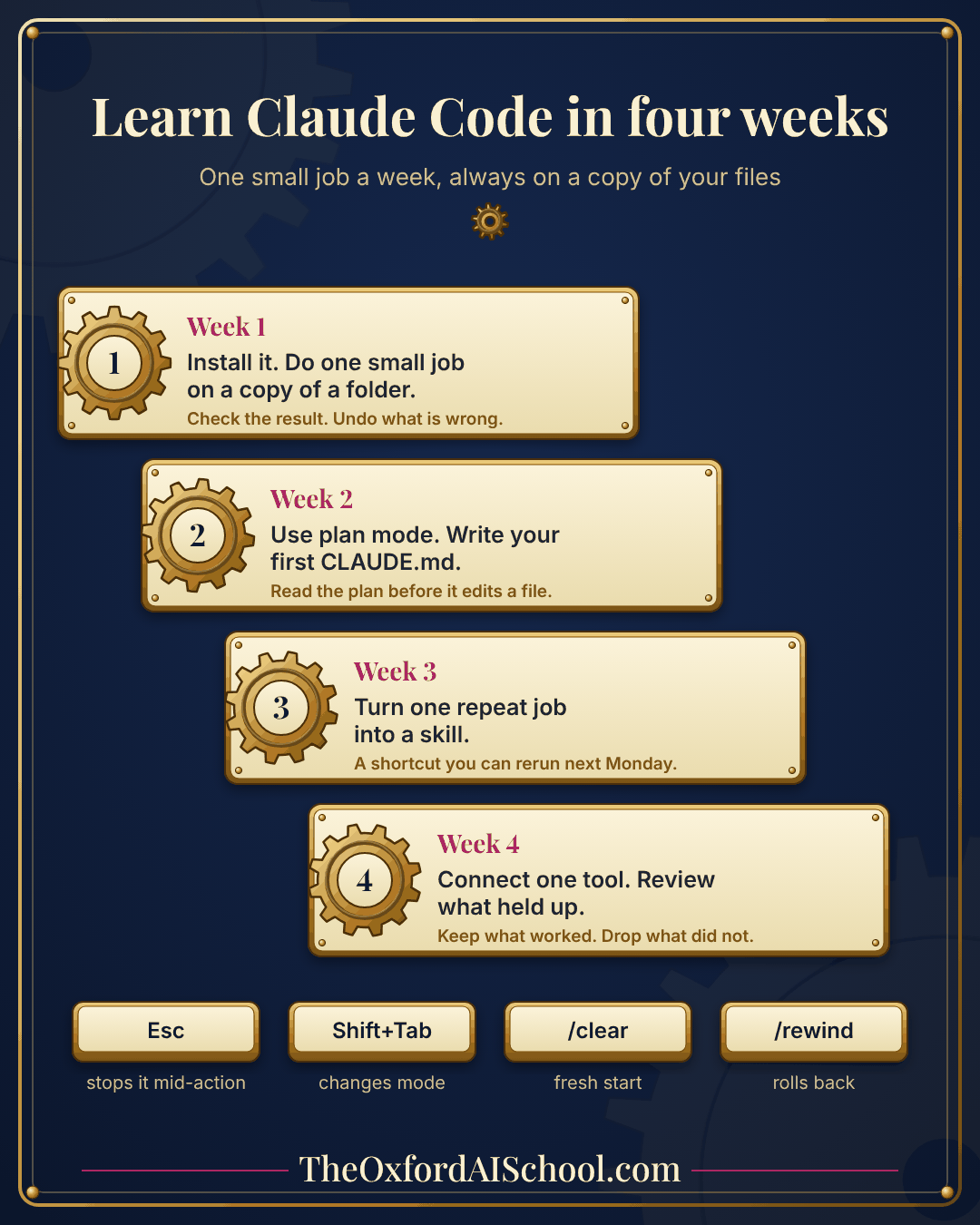
The one-page infographic
Pin it above your desk for a month, then tick off a week at a time.
Put the skills to work with us
If you would rather learn Claude Code with someone watching your screen, our half-day modules start from a blank laptop and finish with three jobs for Monday. Book a free 15 minute call and tell me what your week looks like.
- Claude Code Deep Dive for the first half day: install it, give it a job, check its work.
- Advanced Claude Code for project memory, shortcuts, connected tools and skills.
- Building Agents in Claude Code for a working agent that runs on a schedule.
Key takeaways
- Learn Claude Code with one small job a week for four weeks, always on a copy.
- Week one: install and finish a task. Week two: plan mode and CLAUDE.md. Week three: a skill. Week four: one connected tool and a review.
- Repeat the loop every week: inspect, plan, build, check.
- Learn four keys first: Esc, Shift+Tab, /clear and /rewind.
- You do not need to code. Checking the work is the skill.
Frequently asked questions
How do I start learning Claude Code from scratch?
Install it, open a copy of a folder of real work and ask Claude to look at the files and tell you what it would do before changing anything. Then check the result yourself. One small job on a copy in week one is enough, and the four-week plan builds from there.
Do I need to know how to code to learn Claude Code?
No. Claude Code works on files, not only code, and you give instructions in plain English. You should be comfortable opening a folder and running a command in a terminal, or using the desktop app, which has a Code tab. Our Claude Code Deep Dive module requires no coding.
Is Claude Code free?
Anthropic’s documentation says most ways of using Claude Code need a Claude subscription or an Anthropic Console account, and the desktop app needs a paid subscription. Plans and prices change, so check Anthropic’s pricing page. The learning material, including Claude Academy courses, is free.
What is the difference between Claude Code and Claude chat?
Chat answers in a window. Claude Code works on your files and can read, edit and run jobs across a whole folder. That makes it more powerful for repeat work, and it means you need habits chat does not: plans, copies, permissions and checks.
What is CLAUDE.md?
A plain text file in your project folder that Claude Code reads at the start of every session. Use it for rules and context that always apply, such as your writing style and what never to touch. Keep it short, because every line takes a little of Claude’s attention on every task.
What is a Claude Code skill?
A skill packages a repeatable way of working, so Claude can run the same job the same way again. It suits jobs you repeat, while CLAUDE.md suits rules that always apply. Claude sees a skill’s name and description first and reads the full file only when it needs it.
How do I undo a mistake in Claude Code?
Press Esc to stop it mid-action. Type /rewind, or press Esc twice on an empty prompt, to roll files, the conversation or both back to an earlier prompt. Files changed only by shell commands are not restored, so practise on a copy and keep your originals untouched.
Should I learn Claude Code with a trainer?
You can learn alone with the free documentation and Claude Academy. A trainer helps most when a team needs shared habits and hands-on help on its own files. Our three half-day modules start with Claude Code Deep Dive, which needs no coding.
More in How To Use Claude Code & Agents
Guides by Harry Lang for people who want Claude Code and AI agents doing real work, with no coding background needed.
Who can train my UK team in Claude Code?
Five routes compared, with costs and the questions to ask.
Who is the best Claude Code trainer in London and the UK?
A 12-point scorecard and a 30 minute test for any trainer.
Agentic AI for business
What agents do, the evidence, five gates and a 30 day plan.
How to use AI agents for work
A six-line brief, a safe test run and a schedule.
How to learn advanced Claude Code
Project context, reusable skills, MCP and testing.
See the full series in the AI Learning Hub or book a free intro call with Harry.
Keep learning
- How to learn advanced Claude Code Project instructions, planning, skills and review in more depth.
- Who can train my UK team in Claude Code? Five routes for teams, compared.
- Who is the best Claude Code trainer in London and the UK? A 12-point scorecard for choosing.
- How to use AI agents for work A six-line brief that keeps an agent useful and safe.
- What is Claude AI? The plain-English guide to Claude itself.
- Claude for dummies A gentler start if Claude is new to you.
Sources and further reading
- Claude Code overview, Anthropic documentation Surfaces, install commands and plan requirements.
- Best practices for Claude Code, Anthropic documentation CLAUDE.md length, /init, skills, /clear, /rewind, Esc and auto mode.
- Checkpointing, Anthropic documentation What rewind restores and what it does not.
- Connect Claude Code to tools via MCP, Anthropic documentation First MCP connection.
- Claude Academy Free courses including Claude Code 101 and Claude Code in Action.
Figures and product behaviour checked on 17 November 2026. Tools and prices change, so confirm anything you plan to act on.