
I get asked this a lot in training sessions. Usually by someone who has just watched a 22-year-old on YouTube build an entire app “in 11 minutes” and now suspects they’ve been using Claude wrong.
They haven’t. They’ve been using the right tool for most of their work. But there’s a second tool sitting next to it, and the gap between the two is where a lot of small businesses are about to fall behind.
The numbers make the point. McKinsey’s State of AI in 2026 survey found the share of large organisations scaling AI agents rose from 27% to 40% in a year. Smaller organisations stayed flat at 22%. Same tools, same prices, same models. The difference is mostly confidence, and confidence is teachable.
So here’s where things stand today.
What does each one do?
Claude is the assistant you talk to: it thinks, writes, researches and produces documents from what you upload or connect. Claude Code is the same model given access to your actual files and tools, so it can make changes, run them, test them and keep going on its own.
Claude (the app): your AI colleague for thinking and writing
Claude is where most people should spend most of their time. Ask a quick question or hand it a report, a spreadsheet or a deck, and it gets on with it. Since Opus 5.5 arrived in September you don’t even have to pick a mode first. New to it? Start with What is Claude AI? or Which Claude do you need?
What it gives you:
- Projects. A home for your documents and instructions, so you can stop re-explaining your business every Monday morning. (How to use Claude Projects.)
- Connectors. Claude plugs into Gmail, Microsoft 365, Google Drive, your calendar and a growing list of other tools, so it works from your real information rather than whatever you remembered to paste in. (How to add connectors in Claude.)
- Artifacts. Proper Docs, Slides and Designs you can edit yourself, instead of arguing with a chat window about paragraph three.
- Skills. Saved instructions for the jobs you do over and over, so Claude does them your way every time. (How to add and use skills in Claude.)
- Scheduled tasks. Jobs that run while you sleep and are waiting for you with your first coffee.
Claude Code: the same brain with the keys to the building
Claude Code is the same model with its sleeves rolled up. Anthropic’s own best-practice guide draws the line simply: a chatbot answers your question and waits, while Claude Code reads your files, runs commands, makes changes and works through the problem while you watch, redirect or wander off.
In practice that means:
- It works on your actual files and folders, not a summary of the three you uploaded.
- It writes code, runs it, tests it and fixes what breaks.
- It builds websites and deploys them. Live, not a mock-up.
- It splits one job across a team of subagents working in parallel (dozens of them, if you’re feeling brave).
- It follows hard rules you set, every single time, through things called hooks.
- It keeps going while you’re stuck in a meeting, and you can start it from your phone.
Same brain. Different hands.
Claude vs Claude Code side by side
The model is the same. What changes is what it can touch, what it hands back and how reliably it follows your rules.
| Claude | Claude Code | |
|---|---|---|
| Best for | Thinking, writing, research, documents | Building things that run, and repeat work on files |
| Works on | What you upload or connect | Your actual folders and files |
| Typical output | A doc, deck, email, report or dashboard | A website, tool, script or automated pipeline |
| Doing several jobs at once | One conversation at a time | Teams of subagents in parallel |
| Rules | Instructions it follows most of the time | Hooks that run every single time |
| Where you start | claude.ai, desktop or mobile app | The Code tab in the desktop app, or the terminal |
| Skill needed | Clear briefs | Clear briefs, plus checking and managing the work |
| Our training | AI Basics Deep Dive | Claude Code Deep Dive |
What can you build in each?
Claude builds things you read: proposals, decks, research and content. Claude Code builds things that run: websites, internal tools, scripts and agents that work on a schedule.
What you build in Claude
- Proposals and pitch documents. Give it the brief, two past winners and your pricing, and the first draft arrives sounding like you rather than a procurement portal.
- Strategy docs and board papers. Load the numbers into a Project and ask it to find the three things the board will actually ask about.
- Slide decks. Built as editable Slides, so you can fix the font on slide 7 yourself.
- Email sequences. Welcome, nurture, win-back. Written once, refined forever.
- Research reports. With web search switched on it reads dozens of sources and tells you where they disagree, which is usually the interesting bit.
- A content calendar. A month of posts in your tone of voice, before lunch.
- A dashboard made from the spreadsheet you’ve been avoiding since March.
What you build in Claude Code
- A full website. Designed, built, tested and deployed. I’ve watched clients go from a blank folder to a live site in an afternoon.
- An internal tool your team will actually use. The quote calculator, the booking tracker, the thing currently held together by a spreadsheet and one person’s memory.
- A script that renames 4,000 product photos before the kettle boils.
- An agent that checks your inbox at 6am, sorts the leads and drafts the replies.
- A pipeline that writes, checks and publishes 30 SEO pages without you touching it.
- Software you’d otherwise buy. McKinsey found nearly a third of organisations (32%) had decided against buying at least one software product or feature because they could now build it themselves with agentic coding tools. That’s a subscription line coming off your P&L.
If the output is something you read, use Claude. If it’s something that runs, use Claude Code.
When should you upskill into Claude Code?
Move up when you’re copying and pasting between tools all day, still pressing go on the same weekly job, or need several specialists working on one task. Those are the limits of a chat window, and Claude Code removes them.
Five signs you’ve outgrown Projects
- You copy and paste between Claude and other tools more than five times a day. At that point you’re not using AI. You’re its courier.
- The same task happens every week and you’re still the one pressing go.
- One job needs several specialists at once: a researcher, a writer and someone to check the work.
- The work lives in hundreds of files on your computer, and Claude only ever sees the handful you remembered to upload.
- You’ve said “can’t it just… do it?” out loud. To your laptop.
What can agents in Claude Code do that Projects can’t?
- Run side by side. Five agents researching five competitors at the same time, then one pulling it together.
- Check each other’s work. One builds, and a fresh one with no attachment to the result tries to pull it apart.
- Move around your whole folder structure, reading and changing files rather than describing them.
- Use any command-line tool, which in practice means almost any piece of software that has one.
- Follow rules every single time. Anthropic’s docs make the distinction plainly: written instructions are advisory, hooks are guaranteed. If something must never happen, a hook makes sure it doesn’t.
- Keep running after you’ve closed the lid.
For the bigger picture, read Agentic AI for business: what it is and where to start.
Do you need to be technical to use Claude Code?
No. Wharton professor Ethan Mollick, who has spent longer watching people use these tools than most, put it well:
“Managing agents is really a management problem.”
Can you set a clear goal? Can you give context? Can you divide up the work and give useful feedback? If you’ve ever run a team, you already have most of the skills. The rest is learning where the buttons are, and that takes days, not years.
One honest note. The gap between the two is narrower than it was a year ago. In October Anthropic brought chat and Cowork into one home, and the app now handles a lot of multi-step work by itself. But Claude Code is still where you go when you want to build the machine rather than ask it questions.
A four-week route up from Claude to Claude Code
Spend one week on each step: a boring folder, a CLAUDE.md file, one weekly job turned into a skill, then a second agent that checks the first.
Week 1: One boring folder
Open Claude Code in the desktop app, point it at a copy of a folder of something boring (invoices, product photos, old blog posts) and ask it to tidy, rename or summarise. Watch what it does and how it asks permission.
Week 2: Write your CLAUDE.md
Write your CLAUDE.md file: who you are, what the business does, how you like things done. Notice how much less you have to explain.
Week 3: One weekly job becomes a skill
Take one job you do every week and turn it into a skill. Then schedule it.
Week 4: Add a checker
Add a second agent whose only job is to check the first one’s work. This is the moment it stops feeling like a toy.
Want the detailed version, with prompts for each week? Read How to learn Claude Code: a 4-week plan for beginners, then How to use AI agents for work: a six-line brief.
Tips and secret tactics for Claude
Give Claude your voice, your examples and your repeat jobs as skills, and keep each piece of work in its own Project.
- Put a “how I write” doc into your Master Context box (click your name bottom left in the app, then Settings, then My Claude). Your drafts stop sounding like direct mail from a bank.
- Tell it to interview you at the end of every initial prompt. “Ask Me Questions To Clarify” is my stock phrase. Three good questions up front save three rewrites at the end.
- Paste an example or a link to what good looks like. Claude copies an example far better than it follows a description.
- Anything you’ve asked for three times should be a Skill you add. Write it once, use it forever. (See the best Claude skills.)
- Give every client or big piece of work its own Project. Context bleeds otherwise, and your accountant’s newsletter does not need to know about your estate agent’s launch.
- Ask for the artifact, not the answer. A Doc or a deck you can edit beats a chat reply you have to copy into Word and fix.
- Start a fresh chat when it starts going wrong. Long, muddled conversations get worse, not better. Take the best bits into a new one with a clearer brief.
- Ask it to argue with you. “What’s the strongest case against this?” is the cheapest second opinion you’ll ever get.
Tips and secret tactics for Claude Code
Write a short CLAUDE.md, ask for a plan before the build, give it a way to test its own work and use hooks for anything that must never be skipped.
- Write a CLAUDE.md file. It’s the induction pack your agent reads every time it starts work. Ten sharp lines beat a hundred vague ones. Anthropic’s own test for every line is whether deleting it would cause mistakes. If not, it goes.
- Ask for the plan before the build. Reading a plan is cheaper than unpicking a confident mistake. Plan mode (
Shift+Tab) exists for exactly this. - Use subagents to check work as well as do it. One builds it and another tries to break it.
- Start in the desktop app, not the terminal. You don’t need to know what bash is on day one.
- Give it a way to test its own work. “Done” should mean it ran, not that it looks finished. Anthropic’s guide puts the value of a runnable check like this: “It’s the difference between a session you watch and one you walk away from.”
- Back up the folder before big jobs. Nobody has ever regretted having an undo button.
- Correct it twice, then start again. If you’ve fixed the same mistake twice in one session, open a fresh one with a better prompt. Anthropic’s guidance is that a clean session with a sharper brief almost always beats a long one cluttered with corrections.
- Use hooks for the non-negotiables. Never touch the live site on a Friday. Always run the spellcheck. Write it as a hook and it happens every time, whether Claude remembers or not.
Ready for more? How to learn advanced Claude Code covers project memory, skills and MCP connections in depth.
The one-page infographic
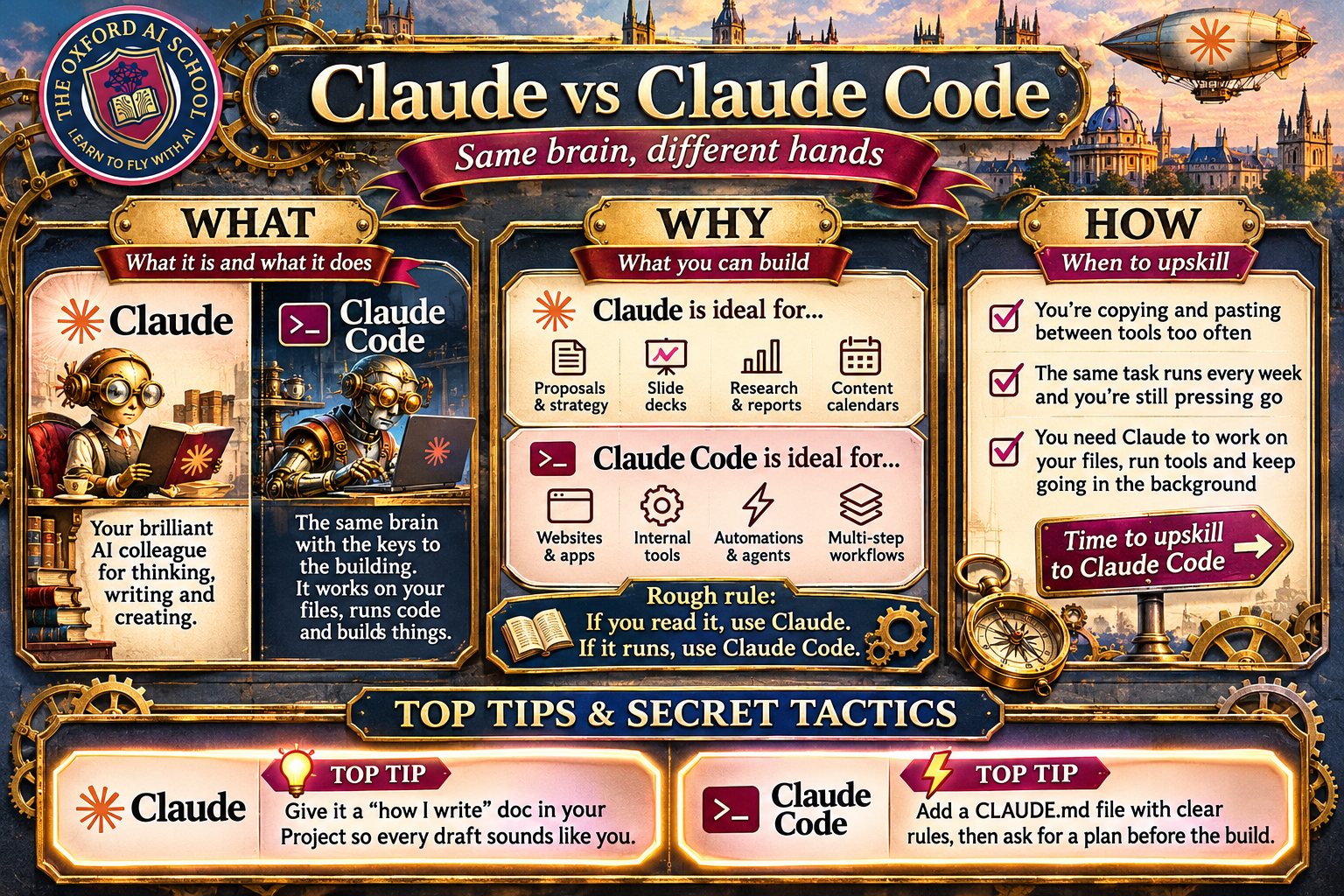
Same brain, different hands. Save it, share it, stick it above your desk.
Key takeaways
- Claude and Claude Code run on the same model. Claude thinks and writes with you; Claude Code works on your files and builds things that run.
- Use Claude for anything you read: proposals, decks, research, content. Use Claude Code for anything that runs: websites, tools, scripts, agents.
- Move up when you’re copying between tools all day, pressing go on weekly jobs, or need several specialists on one task.
- Large organisations are scaling agents fast while smaller ones have stood still, so the opportunity for SMEs is now.
- The core skill is management, not coding: clear goals, good context, and a way to check the work.
Frequently asked questions
What is the difference between Claude and Claude Code?
Claude is Anthropic’s AI assistant app for thinking, writing, research and documents. Claude Code uses the same model but works directly on your files: it runs commands, writes and tests code, builds websites and runs teams of agents. If the output is something you read, use Claude. If it runs, use Claude Code.
Do I need to know how to code to use Claude Code?
No. You need to be able to describe a job clearly, give context and check the result. Start in the Claude desktop app rather than the terminal, point it at a copy of a folder and ask for something simple. Most non-technical people are comfortable within a couple of weeks of regular practice.
Can Claude Code build a website?
Yes. Claude Code can design, build, test and deploy a working website from a folder on your computer. It writes the pages, runs them locally, checks for errors and can publish to hosts such as Netlify. You still decide the content, check the result and approve anything that goes live.
What is a CLAUDE.md file?
CLAUDE.md is a plain text file Claude Code reads at the start of every session. It works like an induction pack: who you are, how the business works, and the rules you want followed. Keep it short. Anthropic advises cutting any line whose removal would not cause Claude to make mistakes.
What are subagents in Claude Code?
Subagents are separate Claude workers that Claude Code hands parts of a job to. Each runs in its own context, so one can research while another writes and a third checks the work. They can run in parallel, which is how one request becomes a small team working at the same time.
Is Claude Code safe to use on my business files?
It can be, with sensible habits. Claude Code asks permission before risky actions unless you change that, and keeps checkpoints you can rewind to. Work on a copy of a folder at first, back up before big jobs, keep sensitive data out until you understand the settings, and review what it changed.
Should my team learn Claude or Claude Code first?
Claude first. Projects, connectors, artifacts and skills cover most daily work, and the habits you build there (clear briefs, examples, checking the output) carry straight across. Move people up to Claude Code once they keep hitting the limits: copying between tools, repeating weekly jobs, or needing work done on many files.
How do I know it’s time to upskill into Claude Code?
Watch for five signs: you copy and paste between Claude and other tools many times a day, a weekly task still needs you to press go, one job needs several specialists at once, the work lives in hundreds of files, or you’ve caught yourself asking why it can’t just do it.
Start in Claude. Move up to Claude Code the day you catch yourself doing the robot’s job for it.
Want your team doing this by next month?
We train UK teams and business owners in Claude and Claude Code, in person and online. Pick the deep dive that matches where your team is today:
- Claude & ChatGPT AI Basics Deep Dive for getting the most out of Claude: Projects, connectors, skills and prompts that sound like you.
- Agentic AI: Claude Code Deep Dive for running Claude Code on your own files, with plan mode, CLAUDE.md and a real job finished on the day.
More in How To Use Claude Code & Agents
Guides by Harry Lang for people who want Claude and Claude Code doing real work, with no coding background needed.
How to learn Claude Code
A 4-week plan for beginners, one small job a week.
Agentic AI for business
What agents do, the five gates and a 30 day plan.
How to use AI agents for work
A six-line brief, a check, a stop and a schedule.
Who can train my UK team in Claude Code?
Five routes compared, with costs and the questions to ask.
Who is the best Claude Code trainer in London and the UK?
A 12-point scorecard and a 30 minute test.
Keep learning about Claude
- Which Claude do you need? Plans, models and apps, explained.
- What is Claude AI? The plain-English guide to Claude itself.
- Claude vs ChatGPT How the two biggest assistants compare for business.
- How to use Claude effectively The habits that get finished work back.
- New Claude features, November 2026 What’s just changed, with prompts to try.
- How to learn advanced Claude Code Project memory, skills and MCP connections.
- Claude for dummies A gentler start if Claude is new to you.
Sources and further reading
- McKinsey & Company, The state of AI in 2026: On the road to ROI (August 2026). Agent scaling by company size; build instead of buy.
- Anthropic, Best practices for Claude Code. Verification, plan mode, CLAUDE.md, hooks, subagents, fresh sessions.
- Ethan Mollick, quoted on Simon Willison’s weblog (January 2026). Managing agents as a management problem.
- Anthropic, Claude release notes. Opus 5.5, artifacts on every plan, chat and Cowork in one home.
- Anthropic, What’s new in Claude Code. Weekly digest of new features.
Figures and product details checked on 19 November 2026.